
Frontend State Management Architecture
State management is the single most common source of architectural debt, performance bottlenecks, and synchronization bugs in modern client-side applications. In many codebases, state becomes a dumping ground: local UI toggles, server-side data caches, active search filters, and session details are shoved into a single global state container.
This conceptual guide moves beyond standard tool comparisons. Instead, it provides a decision framework to classify, locate, and manage frontend state based on its lifecycle, ownership, and accessibility.
1. What "State" Actually Is in a Client System
In a client-side system, state is a representation of the user interface at a specific point in time. Unlike server-side state, which is backed by ACID databases, client-side state is ephemeral, memory-resident, reactive, and highly volatile.
To build scalable frontends, we must categorize state into four distinct axes:
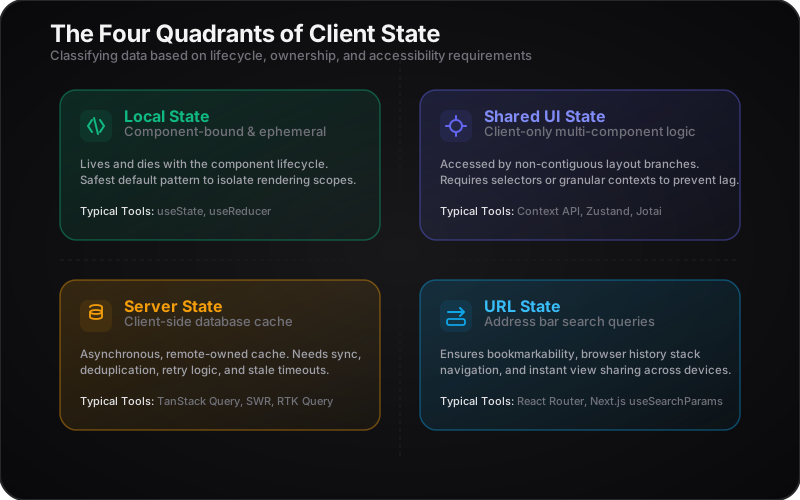
The Four State Quadrants
| State Quadrant | Definition & Characteristics | Typical Examples |
|---|---|---|
| Local State | UI data bound to a single component or immediate sub-tree. Lives and dies with the component lifecycle. | isExpanded toggles, input field text buffers, active carousel tab index. |
| Shared UI State | Client-only data accessed by non-contiguous components across the application layout. | Dark/light theme mode, sidebar navigation collapse state, open modal IDs. |
| Server State | A client-side cache of authority data stored on a remote server. It is asynchronous, multi-master, and subject to stale cycles. | User profiles, message lists, database records, search suggestions. |
| URL State | State represented directly in the browser's address bar. Essential for bookmarking, sharing, and browser history. | Filter tags, page index pagination, search query parameters (?q=react). |
The Consequences of Getting It Wrong at Scale
When senior engineers design client state poorly, three critical issues inevitably emerge:
1. The "Split-Brain" Synchronization Nightmare
When engineers fetch database data (Server State) and sync it into local component state (e.g., via a manual useEffect listener) or duplicate it into a global client store, they create dual authority. When the server data updates, the client store becomes stale, leading to race conditions, visual drift, and database overwrite errors.
2. The Re-render Cascade
Placing high-frequency state (like search keystrokes or mouse track coordinates) in a root-level context or a non-optimized global store triggers a massive re-render cascade. The browser must calculate layout changes for hundreds of components that do not care about the change, killing interaction times (INP).
3. Broken Shareability & UX
Storing routing parameters, filters, or active selection IDs in memory means that if a user refreshes the page or copies the URL to share with a colleague, all configuration is lost. The application reverts to the default empty state, violating first-principles web accessibility.
2. The Architectural Decision Framework
The golden rule of client state is: Never ask "Which tool should I use?" before you have answered "Who owns this data, and how long does it live?"
Here is the decision path to categorize any piece of frontend state:
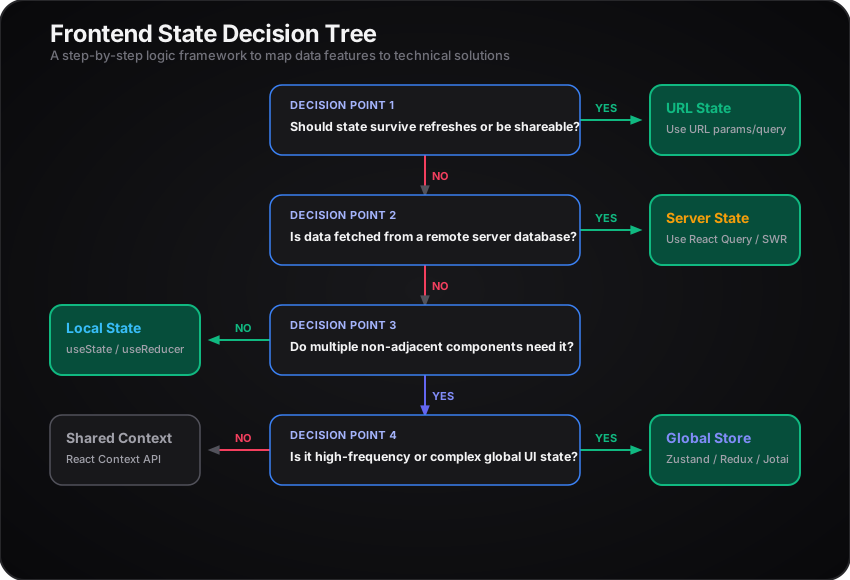
The State Placement Matrix
| Question to Ask | If Yes | If No |
|---|---|---|
| Does the URL need to reflect this state? | Use URL Query Params. Avoid duplicating in component state. | Move to next check. |
| Does this data originate from an API call? | Use a Server State Manager (cached). | Move to next check. |
| Do components in different parts of the tree need this? | Use Shared UI State (Context / External Store). | Use Local State (useState). |
3. Common Architectural Patterns & Trade-offs
Every state pattern introduces a design trade-off. Architectural mastery lies in choosing the lowest-overhead abstraction that fits the requirement.
Pattern A: Component-Local State
The default choice. Encapsulates state within the UI container.
// Local boundary encapsulation: Nothing leaks
function ToggleButton() {
  const [isOpen, setIsOpen] = useState(false);
  return (
    <button onClick={() => setIsOpen(!isOpen)}>
      {isOpen ? "Close" : "Open"}
    </button>
  );
}- Design Trade-off: High encapsulation, zero global render overhead. However, passing updates out requires callback propagation (raising state complexity).
- Best Practice: Keep state as close to the DOM nodes that consume it as possible. Do not lift state until it is strictly necessary.
Pattern B: Lifted State & Prop Drilling
Moving state to a common ancestor component to coordinate child elements.
- When it is fine: Tightly bound parent-child subtrees (e.g.,
<RadioGroup>orchestrating child<RadioButton>elements). - The Problem: When state is drilled down $N$ layers through middle components that do not consume the data. This coupling breaks component reuse and forces middle layers to re-render needlessly.
Pattern C: The React Context API
A mechanism for Dependency Injection (DI), not state management.
[!IMPORTANT] A common misconception is that Context replaces Redux or Zustand. Context acts as a delivery pipe. It does not contain optimization mechanisms to prevent downstream subscribers from re-rendering when any part of the context changes.
// Performance bottleneck pattern:
const AppSettings = createContext({
  theme: "dark",
  lang: "en",
  setLang: () => {},
});

// Any component using useContext(AppSettings) will re-render if theme changes,
// even if they only read 'lang'.
Mitigation Strategies for Context Performance:
- Split Contexts: Separate read and write paths (e.g.,
ThemeContextfor data,ThemeDispatchContextfor state mutators). Since dispatch references remain static, write-only consumers never re-render. - Granular Slicing: Avoid a monolithic
AppContext. Create focused domain contexts (AuthContext,ModalContext,NotificationContext).
Pattern D: External State Stores (Flux vs. Atomic)
When client-side UI complexity is too high for Context, external stores provide high-performance reactivity.
1. Centralized Flux (Zustand, Redux)
- Concept: A single source of truth containing a structured state tree. Components hook into slices using selectors.
- How it scales: Excellent for global, transaction-driven actions and offline sync architectures. Selectors prevent components from re-rendering unless the selected data slice changes.
- Trade-off: Requires structured actions, selectors, and reducer/middleware boilerplate (though modern libraries like Zustand minimize this).
2. Atomic State (Jotai, Recoil)
- Concept: Bottom-up state. State is composed of individual reactive units ("atoms") which can be joined together to create derived atoms.
- How it scales: Components subscribe to specific atoms directly. If Atom A updates, only components listening to Atom A re-render. Perfect for interactive dashboard builders, whiteboards, or spreadsheet canvases.
Pattern E: Server State Managers (React Query, SWR)
Server state is fundamentally different from UI state because the client does not own it. It is merely a temporary cache.
Traditional state management requires you to manage the fetch lifecycle manually:
// The legacy anti-pattern:
const [data, setData] = useState([]);
const [loading, setLoading] = useState(true);

useEffect(() => {
  fetch("/api/tasks")
    .then((res) => res.json())
    .then((res) => {
      setData(res);
      setLoading(false);
    });
}, []);
This approach forces you to build cache keys, handle deduplication, parse error states, and orchestrate request timing by hand.
Why Server-State Tools are a Different Class:
Libraries like TanStack Query replace global state variables with query cache registries keyed by arrays (e.g., ['tasks', projectId]). They handle:
- Automatic background refetching (on window focus or reconnect).
- Cache-stale timing (separating memory-resident cache from state freshness).
- Optimistic updates (updating the UI before the API network roundtrip completes).
4. Real-World Case Study: Collaborative Project Dashboard
To see how these concepts function together, let's map out the state boundaries of a complex web interface: a Collaborative Project Management Dashboard (e.g., a Kanban board containing search filters, real-time collaboration indicators, modal drawers, and system alerts).
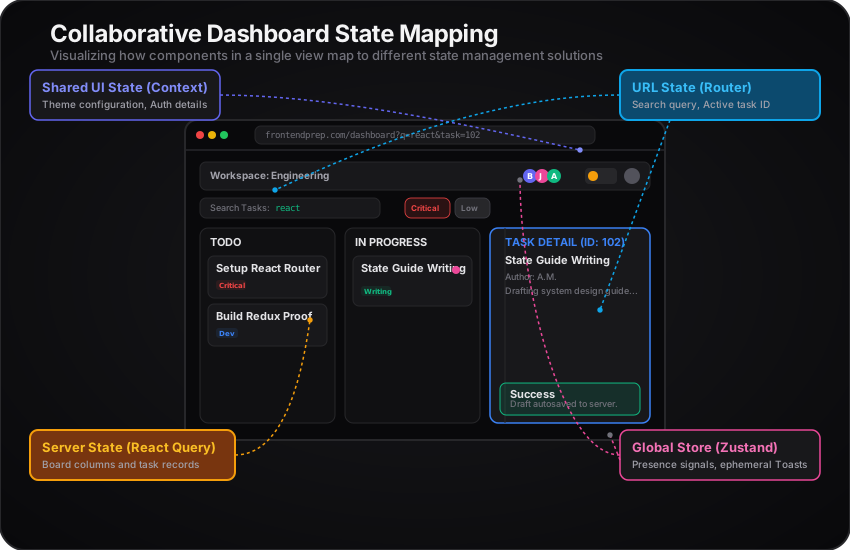
Architectural Mapping of the Dashboard
| Feature / Widget | Data Requirement | Optimal State Type | Concrete Tool / Abstraction | Architectural Rationale |
|---|---|---|---|---|
| Search Queries & Priority Filters | Input values used to query and filter dashboard results. | URL State | Router Search Params (?search=react&priority=critical) | Allows users to copy the URL, share it, bookmark it, and preserve the exact list view on page refresh. |
| Kanban Columns & Task Cards | Authority records representing tasks from the database. | Server State | TanStack Query (['tasks', projectId]) | Needs background syncing, caching, request deduplication, and invalidate-queries triggers on update. |
| Active Task Drawer | Detail view for a clicked card. | URL State + Server State | Query Param ?taskId=123 + TanStack Query cache fetch | Using a query parameter for the modal means clicking a task creates a shareable link that opens the drawer directly on load. |
| User Authentication / Theme | Current user session details and visual presentation settings. | Shared UI State | React Context API | Low-frequency update frequency. Read globally by layout templates. Minimal performance overhead. |
| Real-time Cursor / Presence | Position of other workspace collaborators in real-time. | External UI Store | Zustand Store connected to WebSocket client | Extremely high-frequency updates. Directly bypasses React render loops where possible or utilizes lightweight selectors. |
| Live Toast Notifications | Global notification alert system. | External UI Store | Small, focused Zustand store with custom event triggers | Requires an imperative API (toast.show()) that can be called from non-React helper classes (like interceptors). |
5. What This Looks Like in an Interview Answer
In a frontend system design interview, junior engineers default to listing libraries. Senior and staff-level engineers walk through requirements, constraints, and data attributes.
Junior vs. Senior Interview Performance
The Junior / Mid-Level Script
"For state management, I would immediately install Redux Toolkit. It’s the industry standard. I'd put all the fetched API data in a
tasksSliceand have components dispatchfetchTasks()on mount. I'd also put the theme, the sidebar state, and search filters in the store to keep everything in one place."
- Why this fails:
- No distinction between client UI state and server cache.
- Creates a monolithic state tree with unnecessary boilerplate.
- Ignores URL routing and shareability.
- Defaults to a tool instead of addressing constraints.
The Senior / Staff-Level Script
"I'll structure the state by separating data along two dimensions: authority ownership and accessibility constraints. Let's split this into Server State, URL State, and UI State:
- Server State: All dashboard tasks and user records represent remote authority data. I won't store these in a global client state manager. Instead, I'll leverage a cache-centric manager like TanStack Query. This abstracts our caching, deduplication, and stale-while-revalidate processes without manual lifecycle hooks.
- URL State: For search inputs, filters, and the selected task modal ID, I'll bind them directly to the routing layer. Storing search criteria in the address bar ensures shareability, bookmarking, and correct browser history behaviors.
- UI State: For theme choices and global navigation settings, I will use React Context since changes are low frequency. For complex, high-frequency interactive features like real-time user presences, I'll use a selector-based external store like Zustand to bypass unnecessary render cycles."
6. Frontend State Design Checklist for Interviews
When asked to design any frontend feature, use this checklist to structure your state discussion:
- Data Isolation: Can this state live in a single component? (If yes, keep it local).
- Shareability: If the user sends a link of this screen to another person, what visual data must survive? (Put that data in the URL).
- Authority Ownership: Who is the master of this data? If it's a database, use a server cache. If it's the client configuration, use local/shared UI state.
- Frequency of Change: How often does this state change? If it changes multiple times a second, keep it isolated or use a selector-based state engine (e.g., Zustand or Jotai) to avoid UI rendering lag.