Learn React 19 Server Components from fundamentals to production patterns. Understand server rendering, streaming, performance benefits, and common pitfalls.
React Server Components (RSC) represent a paradigm shift in how we architect web applications. Introduced as a stable feature in React 19, RSC allows components to execute exclusively on the server.
Unlike traditional React components that run in the browser (Client Components), Server Components fetch data, access databases, and render HTML directly on the server before transmitting a lightweight, pre-serialized payload to the browser. This eliminates the need to ship the component's execution logic and static dependencies to the client, leading to smaller bundle sizes and lightning-fast page loading times.
2. Why This Matters
Before Server Components, modern frontend architectures relied heavily on Client-Side Rendering (CSR) or request-time Server-Side Rendering (SSR). Both suffered from core architectural limitations:
Heavy JavaScript Bundles: Shipping massive component libraries (e.g., Markdown parsers, date formatters) to the client just to display static text.
Data Waterfall Congestions: Client components fetching data inside nested useEffect calls, triggering a cascade of slow network roundtrips.
High Client CPU Costs: The client browser executing expensive hydration logic and rebuilding virtual DOM trees for content that never changes.
RSC solves these challenges fundamentally by:
Zero Client Bundle Size: Component code stays on the server. Only the rendered UI tree is sent.
Colocated Server Resources: Direct, low-latency access to databases, filesystems, and microservices.
Automatic Code Splitting: Integrates seamlessly with dynamic imports and component boundaries.
3. Prerequisites
Before adopting React 19 Server Components, ensure you are comfortable with:
SSR vs. Hydration: The process where server-generated HTML is brought to life with browser event listeners.
App Router Conventions: Next.js-style file-based routing where all files in directory routes default to Server Components.
Asynchronous JavaScript: Promises, async/await, and stream processing.
4. Mental Model
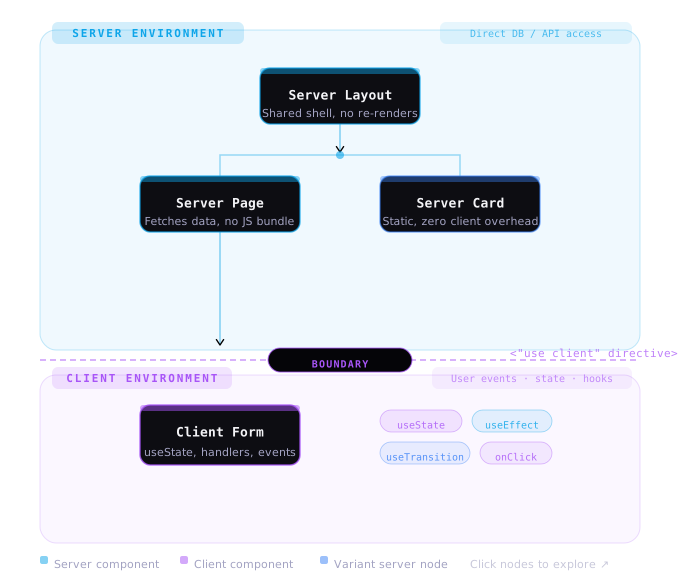
To master Server Components, you must split your component tree into two separate execution worlds: The Server and The Client.
The Boundary Rule
Server Components can import Client Components.
Client Components cannot import Server Components. Instead, they must accept them as children or standard React props passed down from a parent Server Component.
5. How It Works
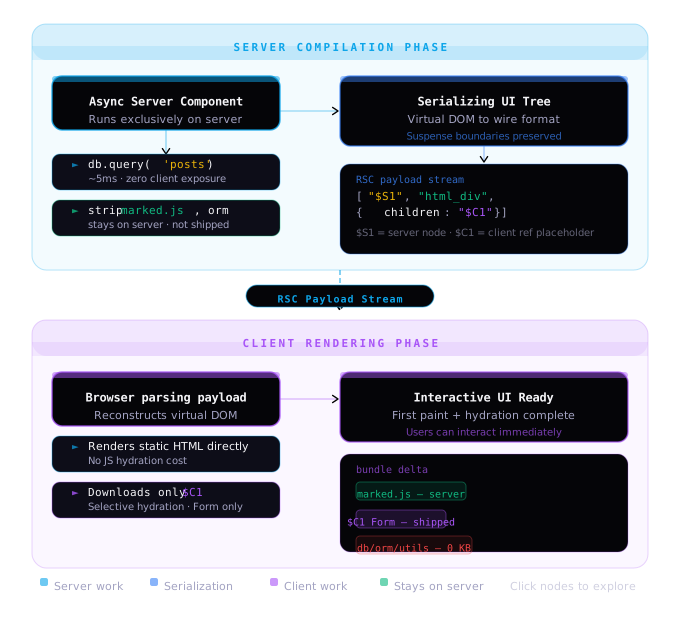
React Server Components are not compiled to HTML. Instead, they are compiled into a specialized, compact JSON-like serialized stream known as the RSC Payload.
The Stream Flow
The server receives the request and resolves the component tree.
Server Components execute. Databases are queried, and filesystem reads occur.
React serializes the resolved server tree into the RSC Payload, representing placeholders for Client Components and raw HTML output for Server Components.
The payload is streamed in chunks to the browser.
The browser reads the stream, mounts the Client Components, hydrates interactive nodes, and renders the static UI instantly without replacing client-side state.
6. Visual Diagram
Here is how React 19 coordinates the client-server serialized boundary:
7. Simple Example
Here is a basic Server Component that accesses the filesystem directly. Note the lack of use client directives and hooks.
tsx
// app/users/page.tsximport fs from "fs/promises";import path from "path";// 1. All components default to Server Components in Next.js App Routerexport default async function UsersPage() { // 2. Direct filesystem read - completely secure, never shipped to client const filePath = path.join(process.cwd(), "data/users.json"); const rawData = await fs.readFile(filePath, "utf-8"); const users = JSON.parse(rawData); return ( <div className="p-6"> <h1 className="text-xl font-bold mb-4">Staff Directory</h1> <ul className="space-y-2"> {users.map((user: any) => ( <li key={user.id} className="p-3 border rounded"> <strong>{user.name}</strong> — {user.role} </li> ))} </ul> </div> );}
8. Real World Example
This production-grade example showcases nested data streaming using React Suspense and a custom Client Component (like a bookmark toggle) embedded as a leaf.
When migrating to React 19 Server Components, avoid these common architectural pitfalls:
1. Using Hooks in Server Components
tsx
// ❌ WRONGexport default async function BadComponent() { const [data, setData] = useState(null); // Error! State is only available in Client Components.}
2. Passing Non-Serializable Props across the Boundary
You cannot pass functions, classes, or symbols as props from a Server Component to a Client Component.
Database Connection Pooling: Direct server connections inside async functions can exhaust database pools rapidly. Always configure connection pools (min: 2, max: 10) or use caching layers.
Request Memoization: Next.js automatically deduplicates fetch requests with identical signatures inside Server Components, but custom data loaders require wrapping with React's cache utility.
Stream Response Buffers: If your page uses heavy static sections followed by a dynamic component, wrap the dynamic component in a <Suspense> boundary to allow the server to stream the static HTML instantly.
11. Best Practices
Keep your React 19 architecture highly clean and performant by adhering to these principles:
Keep Server Components at the Root, Client Components at the Leaves: Keep your data layers and static sections as Server Components, and push interactivity (buttons, forms, animations) down into child leaf nodes.
Use the server-only Package: Prevent server-specific libraries (like database secrets, SQL queries, private API keys) from accidentally being imported into Client Components.
bash
npm install server-only
Then import it at the top of your private files:
typescript
import "server-only";
Use React Actions for Data Mutations: For database writes or form handling, use Server Actions to manage mutations securely without manually coding REST route handlers.
12. Production Recommendations
When deploying to production, follow these rules:
Scale Database Backends: Because your Server Components execute directly on the API server, database traffic will increase. Ensure your database resides on a low-latency network next to the host (e.g. AWS RDS in same region).
Graceful Error Boundaries: If a Server Component throws an error during execution, it can crash the stream. Always use matching error boundary components (error.tsx) in your route segments.
Secure Serializable Mappings: Always sanitize database models before transmitting them to Client Components. Avoid passing direct column values (like password_hash, email_verification_token) in raw payload props.
13. Related Interview Questions
Test your understanding of React 19 rendering mechanics: