
1. Introduction
The JavaScript Event Loop is one of the most critical concepts in modern web development. Because JavaScript is a single-threaded language, it possesses exactly one Call Stack and can execute only one segment of code at a time.
Yet web applications must handle highly concurrent asynchronous tasks like API networking, timers, and heavy UI animations without locking up the browser. The Event Loop is the underlying scheduling engine that coordinates these asynchronous operations, delegating overhead work to browser threads and ensuring the main thread stays highly responsive.
2. Why This Matters
Understanding the Event Loop demystifies seemingly unpredictable asynchronous behaviors that senior candidates are grilled on during elite engineering rounds:
- Zero-Delay Timers: Why does
setTimeout(() => {}, 0)execute after subsequent synchronous console logs? - Execution Priorities: Why do Promise callbacks (microtasks) take absolute precedence over timer callbacks (macrotasks) even when scheduled at the same time?
- Await Suspensions: What actually happens behind the scenes when JavaScript encounters an
awaitstatement inside an async function?
Without a solid mental model of the event loop, debugging complex asynchronous race conditions becomes guesswork.
3. Prerequisites
Before deep-diving into Event Loop internals, you should be familiar with:
- JavaScript Call Stack: How execution contexts are created and pushed onto the execution stack.
- The Event Queue Concept: The FIFO (First In, First Out) queue mechanism.
- Promises & Microtasks: How ES6 Promises handle asynchronous code blocks.
- Async/Await Syntax: The structural wrapper built on top of native Promises.
4. Mental Model
To master asynchronous JavaScript, visualize the browser context as four highly synchronized, interacting components:
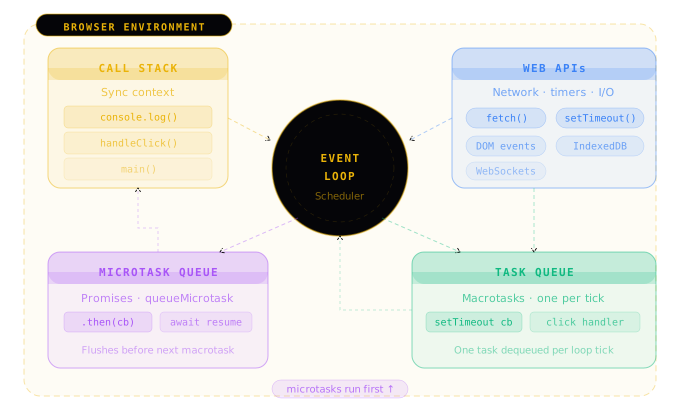
The Event Loop continuously monitors both the Call Stack and the Queues, operating like a highly efficient traffic controller to keep the browser responsive.
5. How It Works
The execution flow of any asynchronous JavaScript program follows these sequential steps:
- Synchronous Execution: The engine pushes synchronous functions onto the Call Stack and executes them using LIFO (Last In, First Out) priority.
- Web API Delegation: When an asynchronous function (like
setTimeoutorfetch) is called, it is pushed to the stack and immediately offloaded to the browser's background threads. - Queue Entry: Once the background operation completes (e.g. the timer ends or the fetch returns), the callback wrapper is pushed into the corresponding task queue.
- The Loop Checks: The Event Loop constantly polls: Is the Call Stack empty?
- Microtask Priority: If the stack is clear, the Event Loop flushes the Microtask Queue completely before executing any macrotasks.
6. Visual Diagram
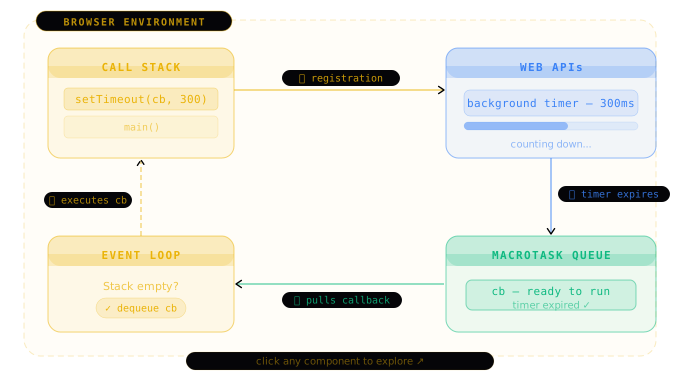
Here is the life-cycle of a setTimeout timer callback moving through the browser boundary:
7. Simple Example
Consider this classic interview execution puzzle:
console.log("1");

setTimeout(() => {
  console.log("2");
}, 0);

Promise.resolve().then(() => {
  console.log("3");
});

console.log("4");
Step-by-Step Logs Output:
1and4are printed instantly as synchronous operations.3is printed next. The Promise callback is pushed to the Microtask Queue and executes the moment the stack is empty.2is printed last. ThesetTimeoutcallback goes to the Macrotask Queue and must wait for all microtasks to clear.
Resulting Output:
1
4
3
2
8. Real World Example
This real-world example demonstrates a highly performant Search Autocomplete debouncer that schedules API requests off the main thread using the Event Loop.
function debounce(fn: Function, delay: number) {
  let timerId: any = null;

  return function (...args: any[]) {
    // Clear scheduled timer inside Macrotask Queue
    if (timerId) clearTimeout(timerId);

    // Schedule new execution context on background Web APIs thread
    timerId = setTimeout(() => {
      fn(...args);
    }, delay);
  };
}

const handleSearch = debounce((query: string) => {
  console.log("Fetching results for:", query);
}, 300);
By postponing the execution context in the macrotask queue, we avoid blocking the Event Loop on every keystroke, keeping input responsiveness smooth.
9. Common Mistakes
Migrating to modern asynchronous codebases can lead to common Event Loop pitfalls:
Mistake #1: Believing setTimeout(fn, 0) is Instant
It is not. It specifies the minimum time before the callback is appended to the Macrotask Queue, and it will still wait behind any active Call Stack operations and Microtasks.
Mistake #2: Forgetting await suspends function context
Using await pauses execution of the current async function and schedules all code below it into the Microtask Queue, returning control back to the outer stack.
async function example() {
  console.log("Before await");
  await Promise.resolve();
  console.log("After await"); // This runs asynchronously inside the Microtask Queue!
}
10. Performance Considerations
A blocked Call Stack freezes the browser completely.
The Blocking Thread Bottleneck
If you run heavy calculations synchronously on the main stack:
// ❌ Blocks the Event Loop, freezing UI rendering entirely!
for (let i = 0; i < 1e9; i++) {}
Because rendering generally runs only between Event Loop ticks (once the Call Stack is empty), this loop prevents style recalculation, layouts, user input clicks, and paints.
Solution: Chunking Tasks
Break large calculations into small asynchronous chunks using setTimeout or requestIdleCallback to yield control back to the Event Loop:
function processChunkedData(items: any[]) {
  if (items.length === 0) return;

  const chunk = items.splice(0, 100);
  process(chunk);

  // Yield control back to allow rendering, then schedule next chunk
  setTimeout(() => processChunkedData(items), 0);
}
11. Best Practices
Adhere to these rules when engineering high-performance asynchronous web pages:
- Do not block the main thread: Outsource CPU-heavy tasks like image processing or large calculations to Web Workers running on background threads.
- Synchronize animations: Use
requestAnimationFrameinstead ofsetTimeoutfor UI changes to synchronize animations perfectly with browser paint frames. - Deduplicate network tasks: Use throttling or debouncing to limit input-based Event Loop actions.
12. Production Recommendations
When deploying large-scale client-side applications:
- Monitor Long Tasks: Utilize the browser's performance APIs or Chrome DevTools to locate any tasks exceeding
50ms(which are labeled as "Long Tasks" and cause user-visible stutter). - Graceful Promise Rejections: Unhandled promise rejections are appended to the microtask queue and can crash execution loops. Always implement global unhandled rejection hooks.
- Cache Expensive Lookups: Utilize memoization or data caches to prevent repeated asynchronous network ticks.
13. Related Interview Questions
Further challenge your browser execution mechanics:
- How does React batched state updates work? Explore React Rendering.
- How are variables preserved across asynchronous ticks? View React Context API.
14. Summary & Key Takeaways
- JavaScript is single-threaded: The browser provides asynchronous Web APIs (timers, network fetches) to offload work.
- Microtask Priority: The Microtask Queue (Promises,
queueMicrotask) is flushed completely before the next Macrotask Queue item (timers, user clicks) is processed. - Rendering Frequency: Rendering runs in a rendering cycle scheduled by the browser, typically executing after the Microtask Queue is completely flushed.
- Keep Stack Clear: Long tasks block the stack, freezing mouse actions, scroll animations, and typing inputs.
- Outsource heavy work: Use Web Workers to run CPU-bound code outside the main Event Loop thread.