
Introduction: A Better Way to Search for Remote Work
Searching for a remote developer role or freelance engineering project can become a repetitive research problem:
- Aggregator noise: The same role may appear across several job boards and newsletters.
- Stale listings: A search result can remain visible after a company has stopped accepting applications.
- Poor-fit roles: Location, timezone, employment type, compensation, or required experience may only become obvious after you open the full posting.
- Low-signal applications: Sending the same resume and message to every opportunity makes it harder to show why you fit a particular role.
AI can help with the research and preparation parts of this process. Firecrawl adds live web data so an AI assistant can search, scrape, and structure information from current public pages.
This guide shows a practical workflow:
Discover → Verify → Filter → Analyze fit → Prepare → Personalize → Apply
AI should accelerate your judgment, not replace it. Always verify that a role is active, that the source is legitimate, and that the final application accurately represents your experience.
Why This Matters: From Search Results to Useful Evidence
The limitation of a standalone LLM
An LLM can help you reason about a job description, compare requirements with your resume, draft outreach, and organize research. But current job information changes constantly, so you should not assume a model's built-in knowledge contains the current state of a job posting.
For current opportunities, use a live retrieval source and treat the retrieved page as the evidence.
Enter Firecrawl: Web data for AI workflows
Firecrawl provides APIs and tools for searching, scraping, crawling, and interacting with web pages. It can return page content as clean Markdown or structured data that an AI system can analyze. Firecrawl supports JavaScript-heavy pages and browser interaction for workflows that require actions such as clicking or pagination.
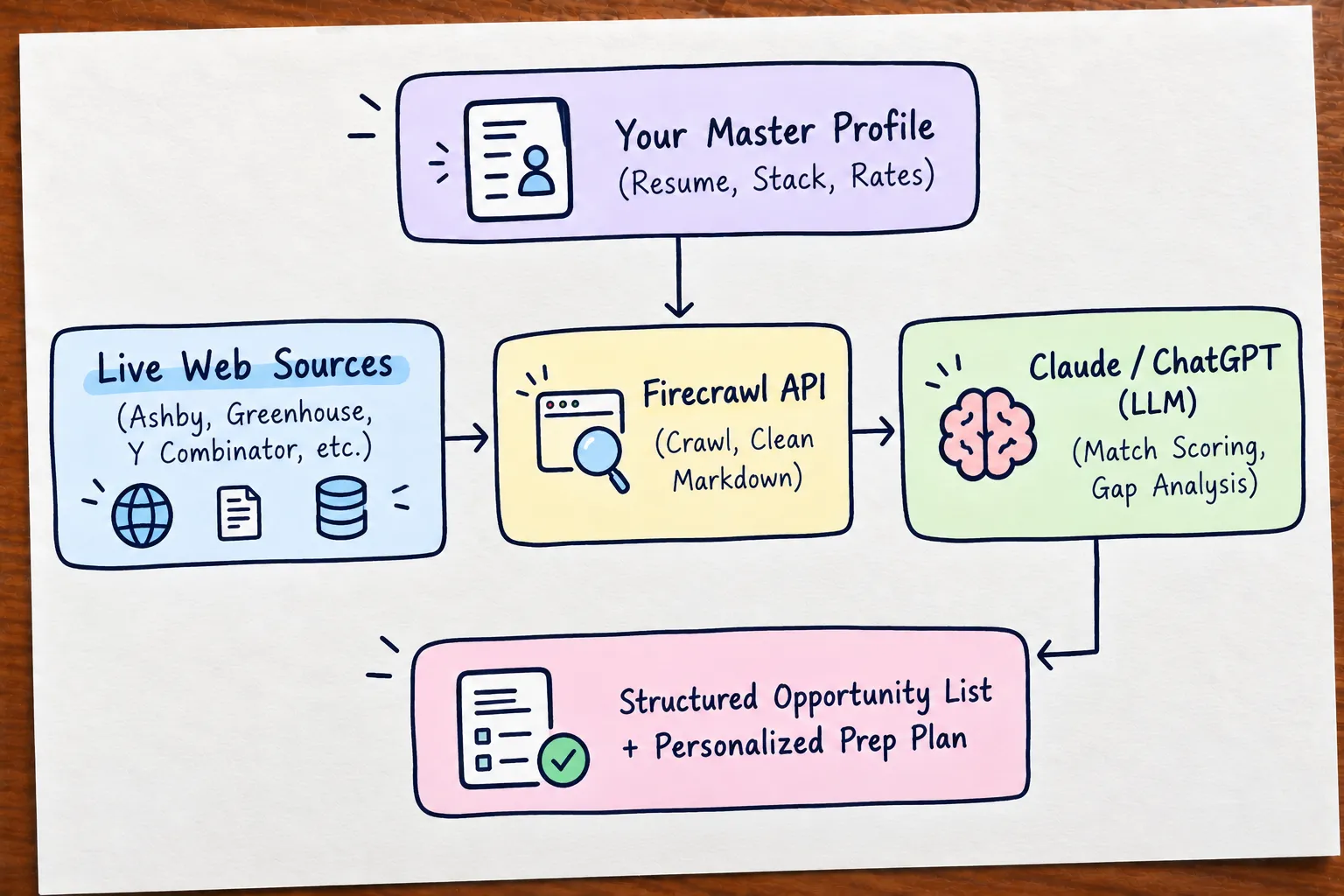
For job research, that creates a useful pipeline:
Search live pages → extract the job details → filter against your constraints → verify the original posting → decide whether to apply
1,000 free credits every month: Firecrawl offers 1,000 free credits per month on its free tier, with no credit card required.
Exclusive 10% Discount Offer: If you decide to upgrade to an eligible paid plan, signing up through my referral link gives first-time users an exclusive 10% discount on all plans.
👉 Start with my Firecrawl referral link (1,000 credits + 10% off)
Mental Model: AI as Your Dedicated Headhunter & Web Crawler
To build an automated job-hunting workflow, consider how an elite executive recruiter works:
| Executive Recruiter Step | How We Replicate It with AI & Firecrawl |
|---|---|
| 1. Ingest Candidate Profile | Load your exact resume, tech stack, timezone, rate floor, and dealbreakers into Claude's system prompt. |
| 2. Scour Niche Sources | Use Firecrawl to crawl startup incubators (Y Combinator Work at a Startup), direct Ashby/Greenhouse job boards, and GitHub repos. |
| 3. Filter Out Noise | Instruct Claude to strictly eliminate agencies, unpaid trials, hybrid constraints, and out-of-scope technologies. |
| 4. Gap Analysis | Have the LLM benchmark your real skills against the job spec to tell you before you apply where you might get stuck in an interview. |
| 5. Strategic Outreach | Generate customized, high-signal outreach notes tailored to the exact engineering challenges mentioned in the post. |
How It Works: 3 Practical Setups
You can use Firecrawl at different levels of complexity. Start with the simplest setup that solves your problem.
Option 1: Use Firecrawl directly with an AI assistant
Firecrawl offers official ChatGPT and Claude integrations, allowing ChatGPT and Claude to search, scrape, crawl, and interact with web data directly from a conversation. Firecrawl also natively supports MCP-compatible AI hosts.
A simple workflow is:
- Create your account at https://firecrawl.link/arvind-m.
- Connect the Firecrawl integration supported by your AI client (Claude.ai or ChatGPT).
- Ask the AI to search for relevant job pages.
- Ask it to extract and compare the evidence against your profile.
- Open the original company posting before applying.
This is the best starting point if you want results without writing code.
Option 2: MCP with developer tools
If you use an MCP-compatible host such as Claude Desktop, Cursor, or Windsurf, Firecrawl can provide live web-search and extraction capabilities inside your development workflow. Firecrawl also provides a CLI/Skill workflow for agents.
This is useful when you want to combine web research with local files such as:
- your resume
- portfolio case studies
- a list of target companies
- notes from previous applications
Option 3: Build your own workflow
For developers, Firecrawl exposes APIs and SDKs for Search, Scrape, Crawl, Map and other web-data workflows. You can combine those with an LLM, a database, Slack/Telegram, GitHub Actions, or a scheduled job-search pipeline.
Important: Firecrawl retrieves web data; it does not decide whether a job is genuinely a good opportunity. Your filtering logic and final verification still matter.
The Master Profile Prompt: Feed Your Exact Preferences
Before querying opportunities, define your Candidate Profile Context. AI is only as good as the context you feed it.
Master Candidate Profile Context
Establish your target seniority, salary floor, timezone boundaries, and tech stack dealbreakers.
[Your Tech Stack][Salary / Hourly Rate Floor][Timezone Bounds]### CANDIDATE CONTEXT
- Role Target: Senior Frontend Engineer / Full-Stack Engineer (React, Next.js, TypeScript)
- Work Preference: 100% Remote (Worldwide or Americas / European friendly timezones)
- Minimum Compensation: [Your salary / rate floor]
- Core Tech Stack: [Your strongest technologies]
- Secondary Skills: [Relevant supporting skills]
- Preferred Employment: [Full-time / contract / freelance]
- Location / Timezone: [Countries, regions, or working hours you can support]
- Dealbreakers / Exclusions:
- [Hybrid/on-site constraints]
- [Employment-type constraints]
- [Compensation floor]
- [Technologies or industries you do not want]4 High-Converting Prompt Blueprints (Ready-to-Copy Actions)
Each blueprint below is designed as a standalone, one-click copyable action. Click "Copy Prompt Action", paste it into Claude.ai, ChatGPT.com, or Claude Desktop, and let Firecrawl search the live web.
Prompt Action 1: High-Precision Remote Job Discovery
Use this action to find active, unbloated remote full-time positions posted in the last 7 to 10 days across direct Ashby, Greenhouse, and Lever portals.
High-Precision Remote Job Discovery
Scour live Ashby, Greenhouse, and Lever listings for remote senior roles posted in the last 7 days.
[Insert your Master Profile Context here]Use Firecrawl Search to find current remote "Senior Frontend Engineer", "Staff Frontend Engineer", or closely related roles.
Focus on:
1. Direct company career pages and reputable ATS-hosted listings.
2. Roles that explicitly state their remote/location eligibility.
3. My actual technology and seniority requirements.
Strict filters:
- Exclude roles that clearly violate my location, timezone, employment-type, or compensation constraints.
- Do not infer remote eligibility when the posting is ambiguous; mark it "Needs verification."
- Prefer recent postings, but verify freshness on the original page before I apply.
Candidate Profile:
[Insert your Master Profile Context here]
For each opportunity found, return a structured markdown table with:
| Company | Role & Location | Tech Stack | Est. Comp / Range | Source URL | Match Assessment |
Followed by: (a) evidence supporting the match, (b) explicit requirements I do not meet or cannot verify, and (c) a short recommendation on what I should verify before applying.Prompt Action 2: Freelance, Contract & Startup Project Scout
Finding freelance contracts requires looking for different signals: startups with sudden funding, technical debt migrations, or short-term contract bounties.
Freelance & Contract Project Scout
Identify companies that show credible public signals of needing freelance, contract, or project-based frontend engineering help.
[Insert your Master Profile Context here]Use Firecrawl to find companies and early-stage funded startups actively looking for freelance frontend contractors or fractional engineers.
Search parameters:
1. Search queries such as "frontend contractor", "React freelance", "Next.js migration", "frontend performance consultant", or "hiring frontend contractor".
2. Look for explicit hiring/project signals rather than assuming that funding means a company needs a contractor.
3. Check company career pages, founder/engineering posts, startup directories, and reputable freelance/contract sources.
Candidate Profile:
[Insert your Master Profile Context here]
Return:
1. Company Name & Contact / Career Link
2. Scope of Project / Role Description
3. Estimated Duration & Hourly / Monthly Budget (if specified)
4. Key Engineering Challenge (e.g., Performance, SSR, Design System)
5. Evidence for why outreach is timely + a tailored 3-sentence pitch angle. Do not invent a budget, project need, contact email, or technical problem that the source does not support.Prompt Action 3: Stealth & Unlisted Direct Founder Outreach
The highest-paying roles often never reach public job boards. Founders post on their blogs, changelogs, or personal sites first.
Stealth & Unlisted Direct Founder Outreach
Find newly funded YC and stealth startups looking for their first frontend hire before positions hit job boards.
[Insert your Master Profile Context here]Use Firecrawl to search recent company engineering blogs, founder updates, company career pages, startup directories, and public hiring announcements.
Query patterns:
- "we are hiring our first frontend engineer"
- "hiring founding engineer frontend"
- "remote frontend founding engineer"
- "frontend engineer hiring"
Criteria:
- Prefer evidence published recently.
- Prioritize companies with a concrete hiring signal.
- Do not assume that a funded or YC-backed company is hiring unless a current public signal supports it.
Return:
- Company & Product Concept
- Founder / Engineering Lead Name & LinkedIn / X handle (if visible)
- Tech Stack details mentioned
- Suggested personalized cold email draft (max 100 words) using only facts supported by the source. Clearly mark anything that still needs verification.Prompt Action 4: Resume Gap & Interview Benchmark Analyzer
Once you have a list of targets, don't blindly send your resume. Run a gap analysis first:
Resume Gap & Technical Interview Benchmark
Perform a deep technical comparison between your resume and a target job to uncover likely interview questions.
[Paste Job Description or URL][Paste your Resume text]Analyze the following job description against my candidate resume.
[Paste Job Description or Job URL for Firecrawl to scrape]
Candidate Resume:
[Paste your Resume text]
Perform a rigorous technical benchmark:
1. Exact Match: Which requirements do I satisfy with strong evidence?
2. Potential Gaps: Which required technologies or architectural patterns are missing from my resume?
3. Recommended Prep Topics: What specific technical interview topics (e.g., SSR caching, state sync, Web Workers, CSS architecture) is this company most likely to drill into?
4. Resume Tweaks: 3 bullet points on my resume I should rephrase to highlight relevant business impact for this specific role.Real-World Example: Build a Simple Job Research Script
If you want to move beyond interactive prompting, you can schedule a small Node.js workflow that:
- searches for relevant pages,
- collects the strongest results,
- sends the evidence to your chosen LLM,
- produces a shortlist,
- asks you to verify the original postings before applying.
// scripts/job-hunter.ts
import FirecrawlApp from "@mendable/firecrawl-js";
import OpenAI from "openai";

const firecrawl = new FirecrawlApp({
  apiKey: process.env.FIRECRAWL_API_KEY || "",
});

const openai = new OpenAI({
  apiKey: process.env.OPENAI_API_KEY || "",
});

async function findRemoteFrontendJobs() {
  const searchResults = await firecrawl.search(
    "Senior Frontend Engineer React Next.js TypeScript remote site:ashbyhq.com OR site:greenhouse.io",
    {
      limit: 10,
    },
  );

  if (!searchResults.data?.length) {
    console.log("No candidate pages found.");
    return;
  }

  const evidence = searchResults.data
    .map((item) =>
      [
        `Title: ${item.title ?? "Unknown"}`,
        `URL: ${item.url}`,
        `Content: ${(item.markdown ?? "").slice(0, 3000)}`,
      ].join("\n"),
    )
    .join("\n\n---\n\n");

  const response = await openai.chat.completions.create({
    model: "gpt-4o",
    messages: [
      {
        role: "system",
        content:
          "You are a job-research assistant. Extract evidence from the supplied pages. Do not invent salary, location, posting dates, hiring status, or requirements. Mark uncertain fields as unknown and recommend verifying the original page.",
      },
      {
        role: "user",
        content: `Candidate profile:\n${process.env.CANDIDATE_PROFILE ?? ""}\n\nWeb evidence:\n${evidence}\n\nReturn a concise shortlist with company, role, remote/location evidence, technologies, compensation if explicitly stated, missing requirements, source URL, and verification notes.`,
      },
    ],
  });

  console.log(response.choices[0]?.message?.content);
}

findRemoteFrontendJobs().catch(console.error);
Important: A research script is not an auto-apply bot. Keep a human verification step before submitting an application.
Common Mistakes to Avoid When Using AI for Job Hunting
AI can make research faster, but it can also make mistakes faster.
1. Automating applications instead of automating research
Do not turn the workflow into mass-generated applications.
- Better approach: Use AI for discovery, extraction, comparison, gap analysis, and drafting.
- Review every final application yourself.
- Never misrepresent experience just because an AI thinks a requirement is a good match.
2. Trusting a stale search result
A search engine result is evidence that a page existed or was indexed — not proof that the role is still open.
- Better approach: Open the original company/ATS page.
- Check whether the application flow is active.
- Record the posting date or closing date when the source provides one.
3. Treating AI match scores as objective truth
A "9/10 match" is only an AI-generated assessment unless you define and validate the scoring method.
- Better approach: Ask for evidence for every match and gap.
- Separate explicit requirements, strong inferences, and unknowns.
4. Scraping without respecting the source
Publicly accessible does not automatically mean unlimited use.
- Respect website terms, robots directives where applicable, rate limits, privacy expectations, and platform rules.
- Avoid collecting sensitive personal information unnecessarily.
- Prefer official company career pages when possible.
5. Applying before understanding the gaps
Finding a promising role is only the discovery stage.
Use the job description to identify:
- technical areas to review
- architecture topics to practice
- examples from your own experience to prepare
- questions you should be ready to answer
Production Recommendations: Turning Discovery into Offers with FrontendPrep
Finding opportunities is only one part of the process. The best crawler in the world won't help you if you freeze when asked about:
- Micro-frontend state synchronization
- Next.js server components lifecycle and streaming hydration
- Designing offline-first cache strategies with IndexedDB
- Live coding a robust debounce with cancelation and immediate execution
- Complex frontend system design interview problems
That is why we built FrontendPrep.
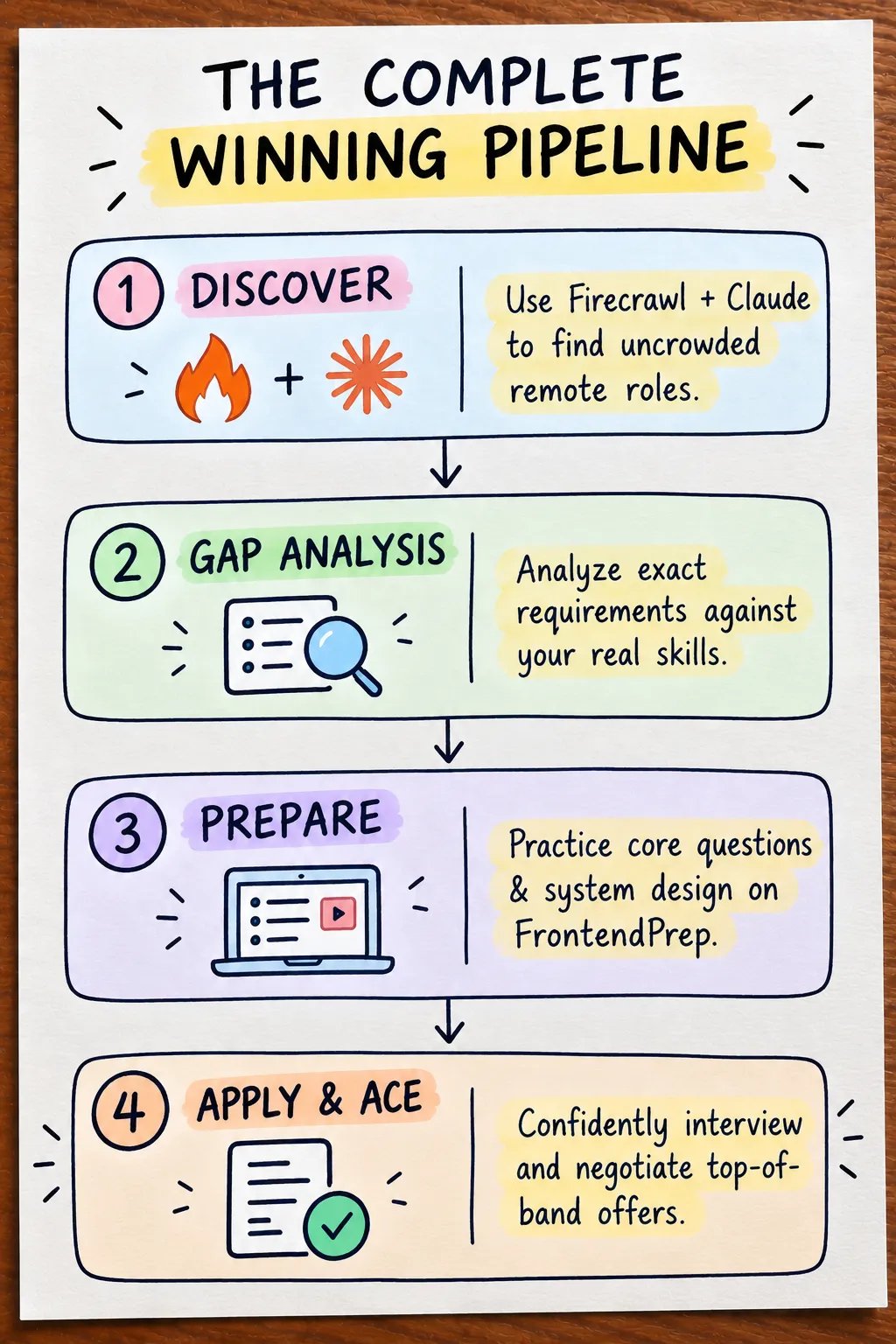
Instead of the old cycle of Search → Apply → Hope, transition to:
- Find the opportunity: Discover fresh, uncrowded listings via Firecrawl before 500 applicants pile on.
- Understand the exact requirements: Extract the exact architectural decisions the company cares about.
- Identify your gaps: Spot the topics where you lack deep production confidence.
- Prepare with precision on FrontendPrep:
- Practice real-world coding challenges in our Interactive Code Challenges.
- Master architectural trade-offs using our Frontend System Design Blueprints.
- Test your understanding with categorized Frontend Quizzes.
- Build foundational mastery across JavaScript, TypeScript, and React in our Learn Modules.
- Apply & Prepare for the Technical Round: Prepare with evidence from your own projects and practice the technical areas the role actually emphasizes.
Summary & Key Takeaways
- Use AI to reduce research time, not to outsource your judgment. Let it search, extract, compare, summarize, and identify gaps — then verify important claims yourself.
- Use Firecrawl when you need current web data. Its Search, Scrape, Crawl, Map, and browser/interact capabilities turn live web pages into clean data an AI workflow can analyze.
- Prefer primary sources. For jobs, that usually means the company's own careers page or the direct ATS page (Ashby, Greenhouse, Lever).
- Separate discovery from verification. A search result is a lead. The original posting is the source you should verify before applying.
- Use a candidate profile. Define your role, seniority, technologies, compensation floor, location/timezone, employment preference, and dealbreakers before searching.
- Ask AI to show its evidence. Match assessments should distinguish explicit requirements from assumptions and unknowns.
- Use Firecrawl's free tier to experiment. Firecrawl provides 1,000 free credits/month on the free tier to test and automate your workflow.
- Claim your 10% discount: First-time users who sign up through my Firecrawl referral link receive an exclusive 10% discount on all plans.
- Then prepare deliberately. Use the resulting job requirements to guide your resume tailoring, portfolio positioning, interview preparation, and technical practice on FrontendPrep.
The goal isn't to apply to more jobs. It's to spend more of your time on opportunities you have actually verified and have a credible reason to pursue.