
Introduction
AI is changing how frontend applications are designed, built, and experienced.
The important shift is not simply that frontend developers can now ask an AI model to write code. AI applications introduce a different class of engineering problems: probabilistic output, streaming responses, tool interactions, runtime validation, context management, failure recovery, security, and new UI patterns.
A useful way to understand this evolution is through the Software 1.0 → Software 2.0 → Software 3.0 framing:
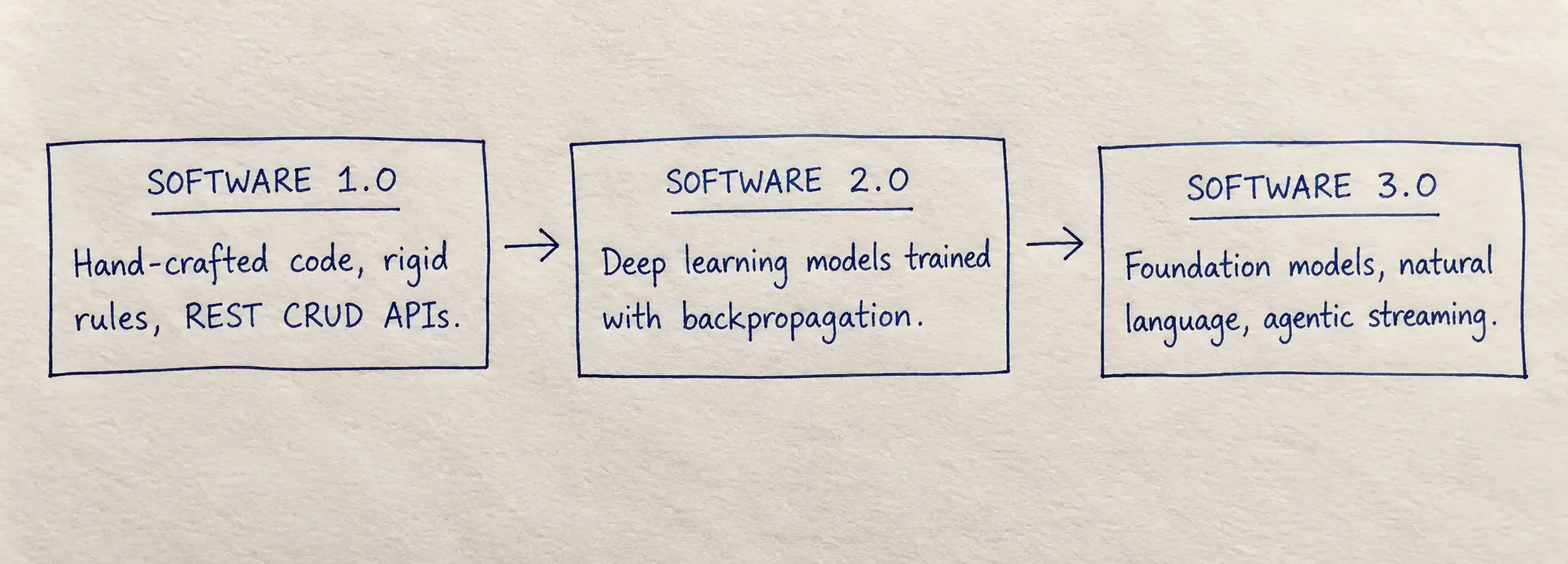
- Software 1.0: Human-written programs and explicit rules.
- Software 2.0: Learned model weights produced through machine learning.
- Software 3.0: Natural-language instructions, context, tools, and foundation models becoming part of the programming interface.
For frontend engineers, the practical implication is that modern AI products combine deterministic application code with probabilistic model behavior.
Why the Frontend Matters
AI systems may perform inference remotely, but the user experiences the result through the interface. That creates frontend-specific engineering responsibilities:
- AI responses arrive incrementally, so the UI needs thoughtful streaming and loading states rather than only a traditional spinner.
- Model output can be incomplete, incorrect, or structurally invalid, so applications need validation, error states, fallbacks, and clear boundaries between model output and application state.
- Tool calls can trigger real application actions, so frontend engineers need to understand authorization, confirmation, and safe tool execution.
- Long conversations and retrieved context consume tokens and can increase latency and cost, so the UI and application architecture need context and token-budget awareness.
- Some ML workloads can run locally in the browser using technologies such as WebGPU, depending on the model, runtime, browser, and device. This can reduce network dependence for suitable workloads, but it is not a replacement for server-side inference in every application.
This guide is the free foundational primer and roadmap for the AI for Frontend Engineers Curriculum.
It is designed to answer three questions:
- What concepts do I need to understand?
- Where does AI change normal frontend engineering?
- What will I learn and build throughout the Pro curriculum?
Current curriculum baseline: Examples and tooling are being maintained against the 2026 ecosystem. Version numbers, model names, pricing, and provider APIs change quickly, so the course treats those details as implementation choices rather than permanent knowledge.
Prerequisites
You do not need a background in data science or machine learning to build AI-powered frontend applications.
What You Need to Know
- Strong JavaScript & TypeScript: Comfortable with functions, objects, interfaces, generics, async/await, modules, and type-safe application code.
- Modern React Fundamentals: Comfortable with state, effects, refs, custom hooks, component composition, rendering behavior, and modern React concepts.
- Async & Web Platform Primitives: Basic familiarity with
Promise,fetch,ReadableStream,TextDecoderStream, andAbortController. - HTTP & Network Basics: Understanding requests, responses, headers, status codes, request bodies, and streaming responses.
- Basic Next.js knowledge is helpful for the later modules, but the core AI concepts are not tied to Next.js.
What You DO NOT Need
- ❌ No advanced calculus or linear algebra: You do not need to calculate matrix operations by hand to build AI applications.
- ❌ No PyTorch or CUDA setup: The curriculum focuses on building applications with existing models rather than training foundation models from scratch.
- ❌ No machine learning research experience: You will learn enough AI fundamentals to make sound application-level engineering decisions without becoming an ML researcher.
The Core Mental Shift: Deterministic Code + Probabilistic Models
Traditional application code is generally deterministic: given the same inputs and environment, the program follows explicitly defined rules.
function calculateCartTotal(items: CartItem[], taxRate: number): number {
  const subtotal = items.reduce(
    (sum, item) => sum + item.price * item.quantity,
    0,
  );

  return Number((subtotal * (1 + taxRate)).toFixed(2));
}
An LLM behaves differently. It generates output token-by-token from a model distribution influenced by the input, model configuration, model version, and other runtime factors.
Conceptually:
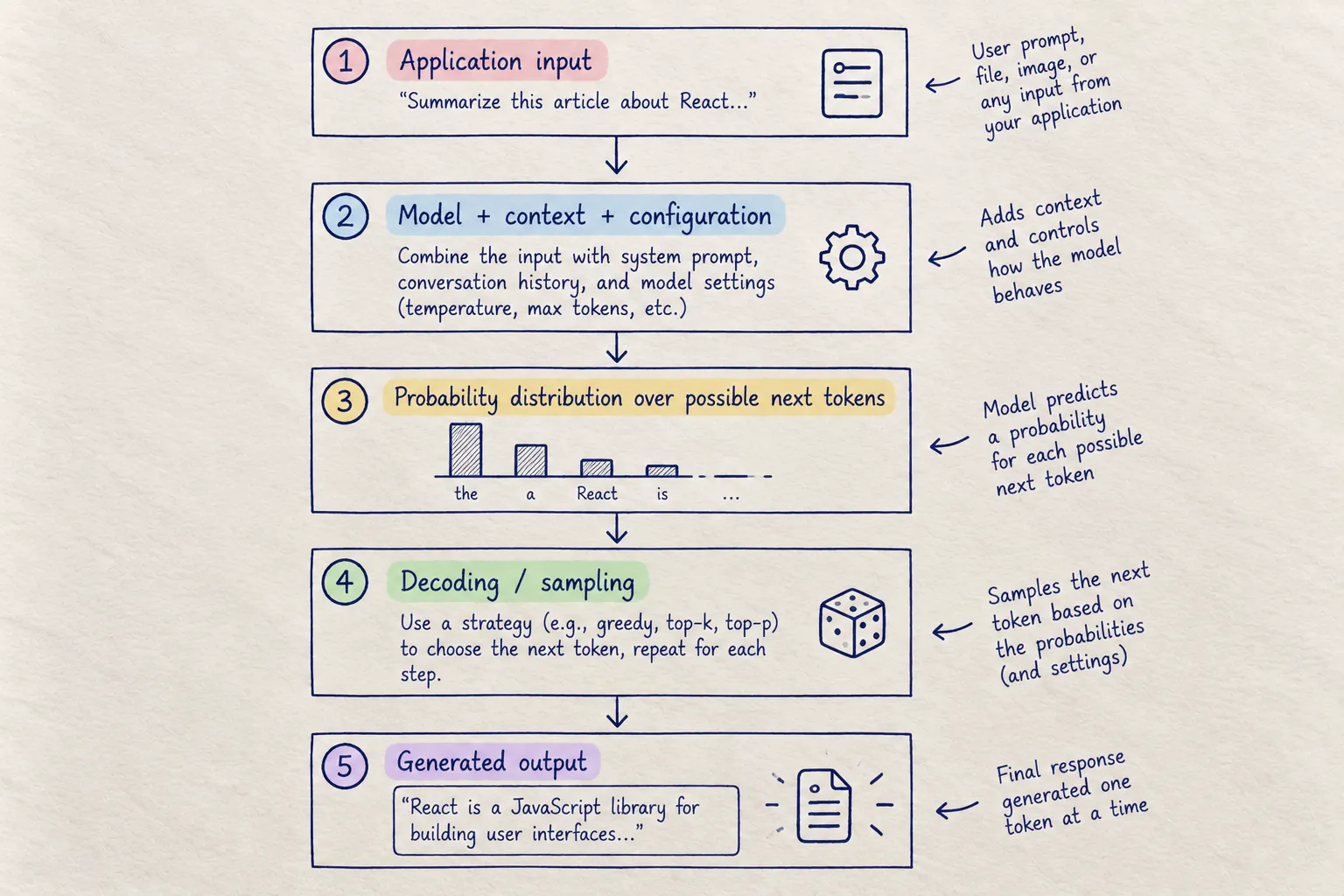
That does not mean an LLM is incapable of producing the same answer twice. It means you should not treat model output as the same kind of deterministic contract as application code.
The Frontend Architect's Rule
Keep deterministic responsibilities in deterministic systems. Use AI where probabilistic generation provides value, and validate the boundary between the two.
Good candidates for deterministic code:
- Authentication and authorization
- Business rules
- Permissions
- Financial calculations
- Database transactions
- Routing decisions
- Input validation
- Security checks
Good candidates for AI:
- Summarization
- Classification
- Natural-language transformation
- Semantic extraction
- Draft generation
- Natural-language search
- Translating unstructured input into a structured request
The goal is not to keep AI away from your application logic. The goal is to make the boundary explicit.
Essential AI Terminology for Frontend Engineers
Before building production AI features, you should understand the vocabulary used by model providers, SDKs, and AI application teams.
1. Tokens & Tokenization
- Definition: Models do not process text as whole words. A tokenizer converts text into model-specific token units, which are represented internally by token IDs.
- Tokenization algorithms vary: Many modern tokenizers use BPE or BPE-derived approaches, but you should not assume every model uses exactly the same tokenizer.
- Rule of thumb for English prose: 1 token is often roughly ¾ of a word or around 4 characters, but this varies substantially with language, code, whitespace, punctuation, and the tokenizer.
Why It Matters to Frontend Engineers
- Cost: Providers commonly price model usage based on input and output tokens.
- Context limits: Token counts determine how much conversation, retrieved information, and tool context can fit into a request.
- Latency: More generated tokens generally means more generation time.
- UX: Streaming output means the UI receives portions of the generated response rather than waiting for the complete answer.
- Product design: Token budgets can influence truncation, summarization, pagination, and conversation-history strategies.
Important: Token counts are model-specific. When estimating cost or context usage, use the tokenizer and pricing information for the model you are actually using.
2. Context Window & Token Budgets
The context window is the amount of tokenized information a model can process within a request, subject to the model and API's limits.
Modern models vary widely in context capacity, and some current frontier models support context windows in the million-token range. Treat context limits as model-specific configuration, not a universal number.
A useful mental model is:
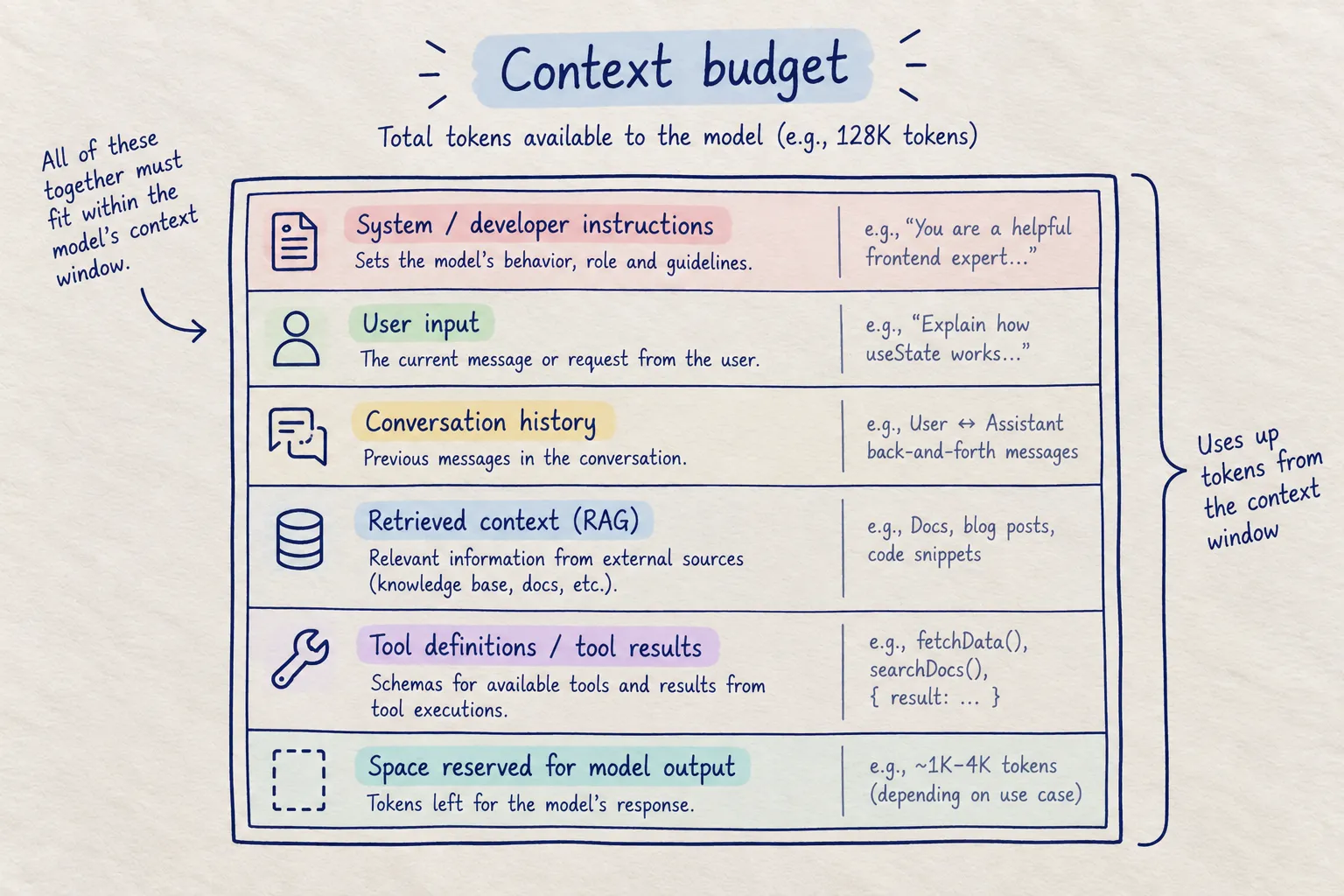
Why It Matters
If a UI continuously sends an entire conversation history, the request can become increasingly expensive and eventually exceed the model's context limit.
Frontend and application strategies include:
- Truncating old messages
- Summarizing earlier conversation
- Retrieving only relevant history
- Limiting tool results
- Limiting retrieved document chunks
- Setting explicit output budgets
- Showing users when older context is being summarized or omitted
3. Inference vs. Training vs. Fine-Tuning
| Process | Definition | Frontend Relevance |
|---|---|---|
| Pre-training | Learning model parameters from large datasets. | Usually outside an application team's day-to-day frontend work. |
| Fine-tuning | Further training a model on a targeted dataset to adapt its behavior. | Sometimes relevant, but usually handled with ML or platform tooling. |
| Inference | Running a trained model to produce an output for a request. | Highly relevant to AI application engineers: requests, streaming, latency, errors, usage, and UI behavior all happen around inference. |
A frontend engineer does not need to train a foundation model to build a production AI feature. You do need to understand what happens around inference.
4. Temperature & Sampling
Temperature is a sampling parameter supported by some model APIs. Lower values generally make sampling more focused; higher values generally allow more variation.
A useful conceptual model:
- Lower temperature → generally less variation.
- Higher temperature → generally more variation.
- Temperature = 0 can behave close to greedy decoding for supported models, but should not be treated as a universal guarantee of identical output across requests, models, providers, or backend changes.
Other controls such as top_p, reasoning settings, stop sequences, and provider-specific parameters vary by model.
Frontend Takeaway
Do not think:
"Set temperature to 0 and AI becomes deterministic."
Think:
"Sampling controls influence model behavior, but application correctness still requires deterministic validation and business logic."
5. Server-Sent Events (SSE), HTTP Streaming & NDJSON
AI applications commonly stream responses over HTTP so users can see useful output before the complete generation finishes.
There are several related concepts:
- SSE (
text/event-stream): A standardized server-to-client event stream over HTTP. It is one-way: server → client. ReadableStream: A browser API for consuming streamed bytes or chunks from a response.- HTTP chunked / incremental streaming: A general concept where a response is delivered progressively rather than as one complete payload.
- NDJSON: Newline-delimited JSON, where each line represents a JSON value. It is a data format, not the same thing as SSE.
SSE vs. WebSockets
SSE is a useful fit when the primary requirement is server → client streaming.
WebSockets are more appropriate when the application needs a persistent, bidirectional communication channel.
The choice should be based on the interaction model rather than treating one protocol as universally better.
SSE also has browser-level reconnection behavior and an event format designed around UTF-8 text streams.
6. Structured Outputs & Runtime Validation
A prompt such as:
"Return only valid JSON."
is not the same thing as a schema-enforced output contract.
Modern model APIs can support structured outputs / schema-constrained generation. These mechanisms can constrain the structure of the generated result to a supplied schema when the selected model and API support the feature.
A useful application boundary is:
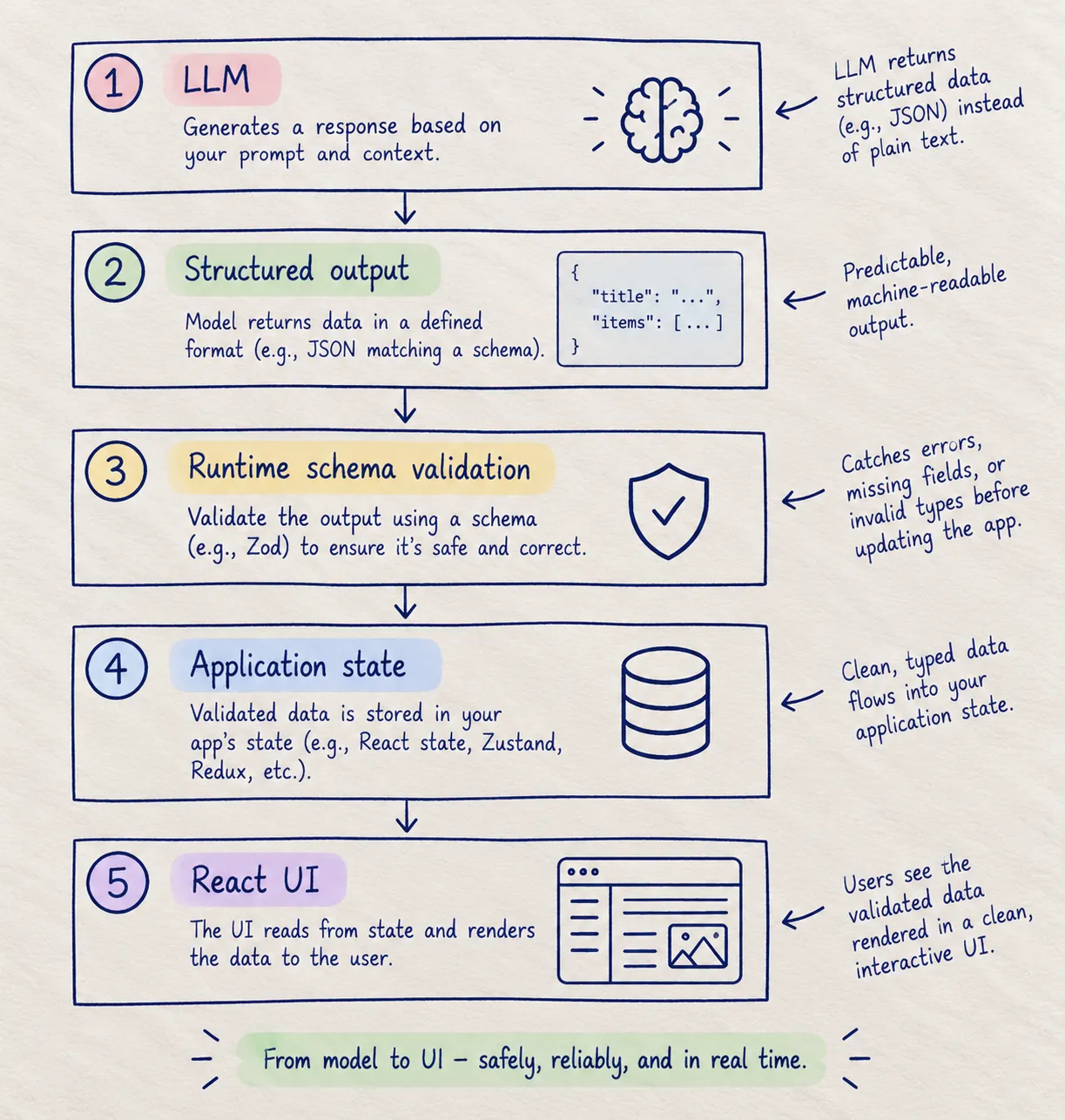
A valid schema does not mean the content is factually correct.
For example, a model may correctly produce:
{
  "price": 99
}
according to the schema while still inventing the price.
So use schemas to validate structure and types, not as a guarantee of truth.
Tools such as JSON Schema and Zod are useful for defining and validating these boundaries.
7. Tool Calling
A model does not automatically gain permission to execute arbitrary application code.
Instead, the application provides a set of tools with defined inputs and descriptions. The model may request a tool call, after which application code decides whether and how that tool is executed.
A safer mental model is:
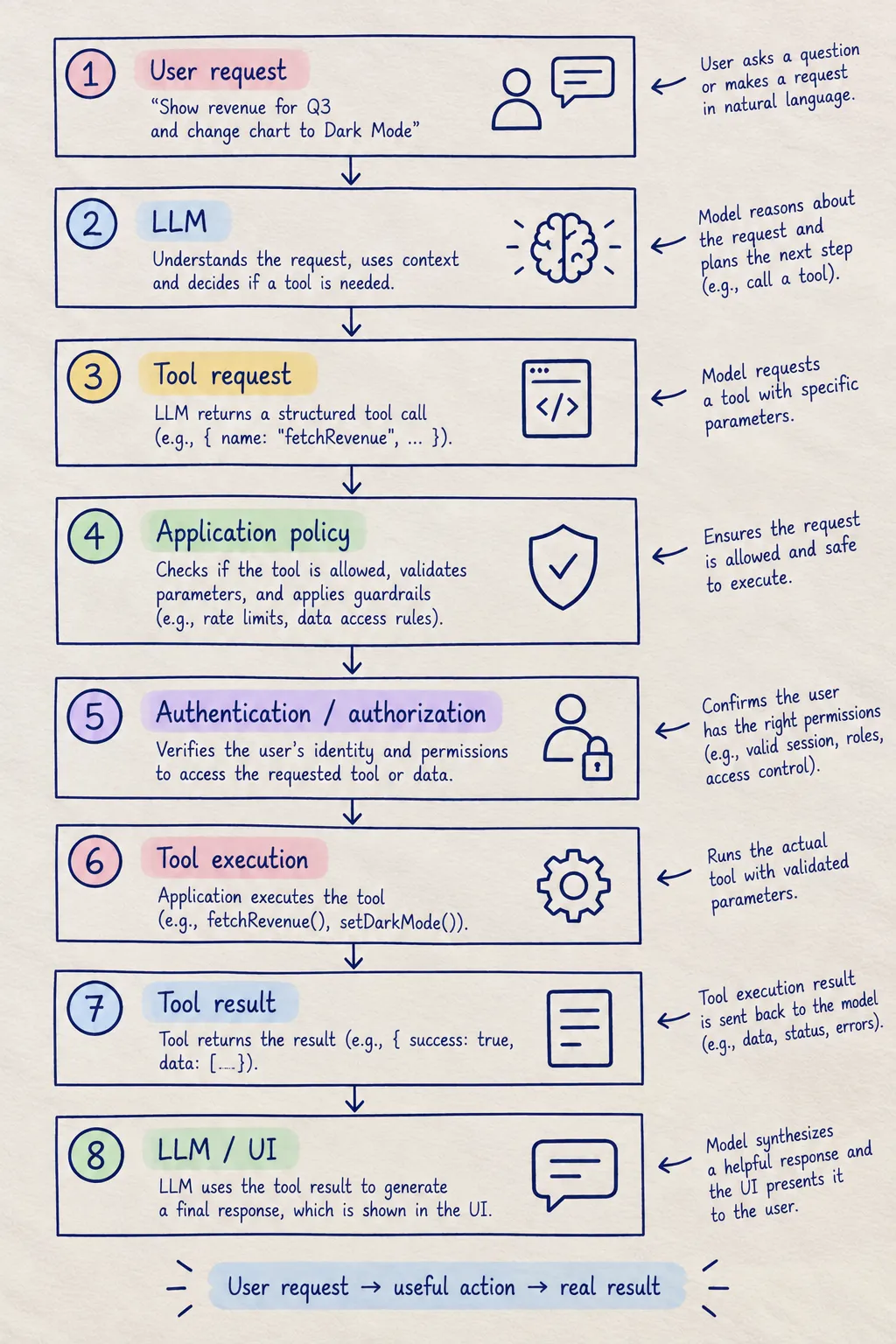
A tool call is a request to perform an action, not authorization to perform that action.
Sensitive actions should be protected by normal application security controls. High-impact actions may also require explicit user confirmation.
This distinction becomes increasingly important as AI systems become more agentic.
8. Generative UI (GenUI)
Generative UI describes interfaces where model output can influence which structured UI elements are presented, rather than returning only a block of text.
For example:
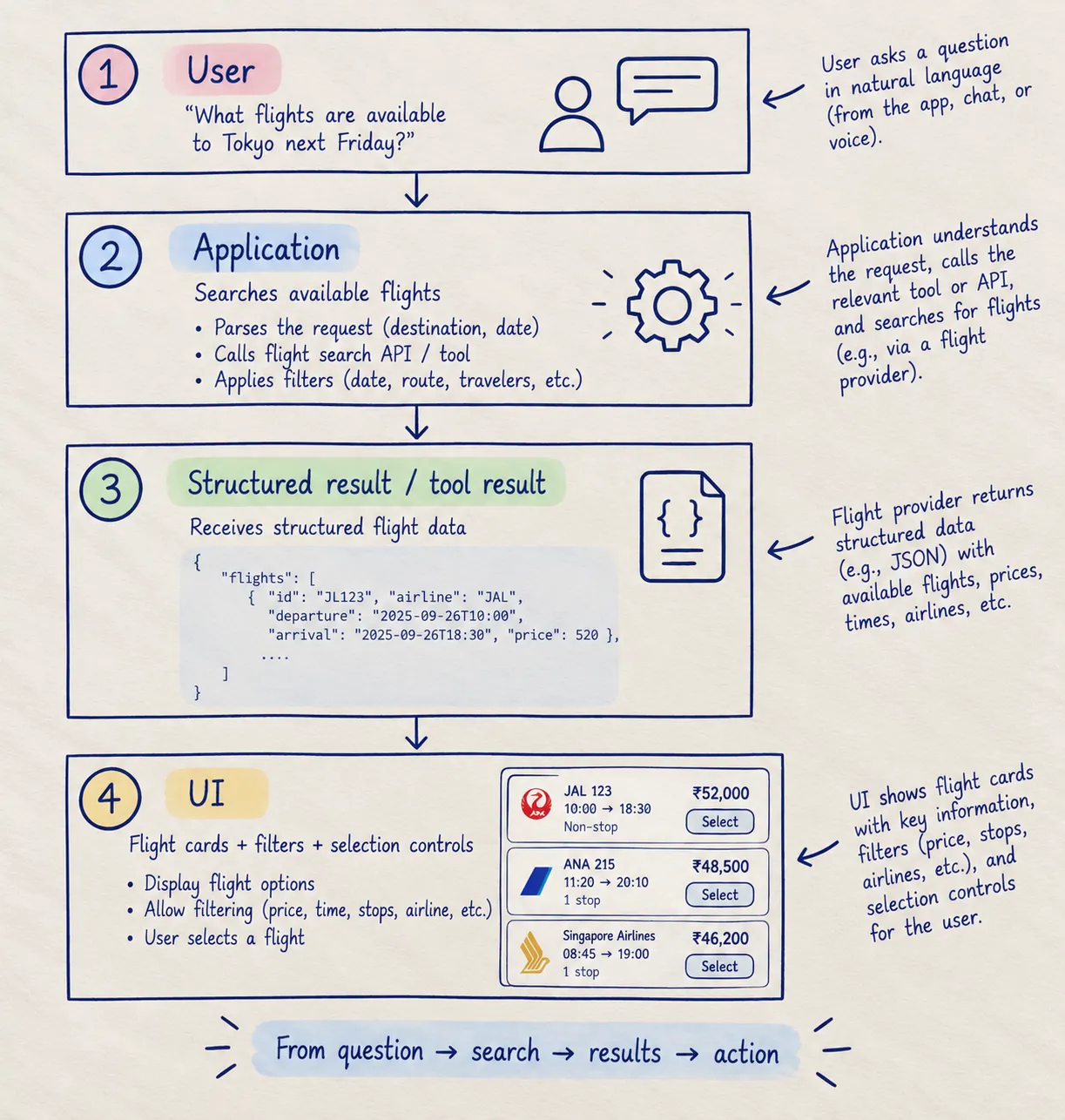
The important architectural idea is:
The model should not be trusted to invent the application's source-of-truth data or bypass authorization.
The application can use model intent or structured tool calls to decide which UI to render.
React Server Components are one possible implementation approach, but not the only one. Current AI SDK guidance treats its RSC package as experimental and recommends AI SDK UI for production use.
9. Embeddings, Vector Databases & RAG
- Embeddings: Numerical representations produced by an embedding model. Similar inputs can produce vectors that are close under a chosen similarity metric.
- Vector database / vector search: Systems optimized for storing and searching vector representations. Examples include pgvector, Pinecone, and Qdrant.
- RAG (Retrieval-Augmented Generation): A pattern where an application retrieves relevant information and supplies that information to the model as context.
A simplified RAG pipeline:
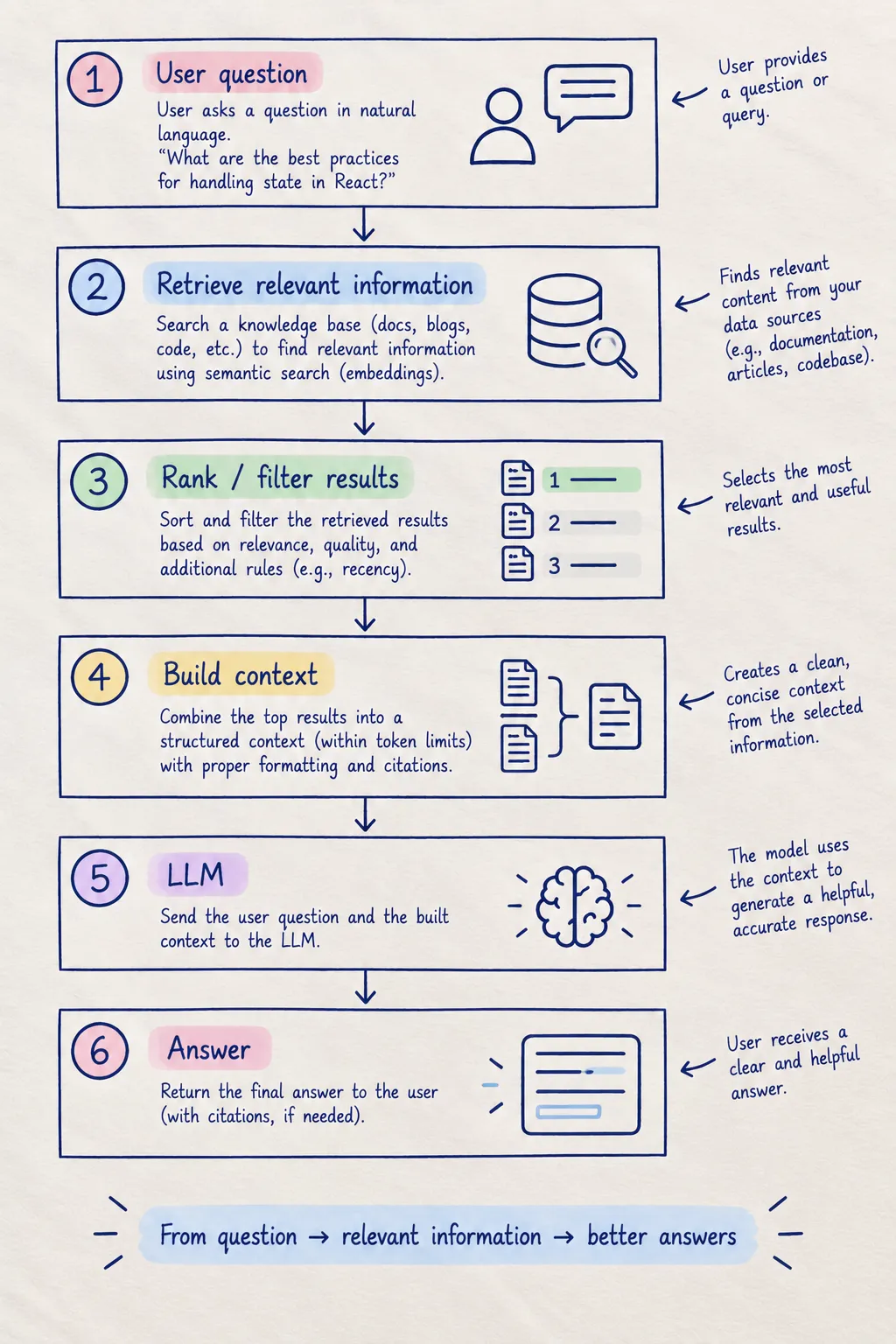
RAG improves the model's access to relevant information; it does not automatically guarantee a correct answer.
Production RAG systems still need to consider retrieval quality, stale documents, permissions, citations, context limits, and model behavior.
10. Role-Based Messages & Conversation State
Conversational APIs commonly represent conversations as structured messages with roles such as:
system/ developer instructionsuserassistanttool
The exact message format varies by provider and API, so treat the following as a conceptual example:
type ChatMessage = {
  role: "system" | "user" | "assistant" | "tool";
  content: string;
};
The frontend implication is important:
Conversation state is application data.
You need to decide what is stored, what is sent to the model, what is displayed to the user, what is summarized, and what should never be exposed.
Why This Matters: 4 Production Frontend Challenges
AI introduces familiar frontend problems in new forms. The most important ones are not about making a model call; they are about making the resulting product feel reliable.
1. Time-to-First-Token (TTFT) & Perceived Latency
TTFT measures the time between sending a generation request and receiving the first generated output.
A slow first response can make an otherwise fast generation feel broken.
Useful frontend techniques include:
- Showing an immediate pending state.
- Reserving space for the response where appropriate.
- Streaming useful output as soon as it arrives.
- Providing a clear cancel/stop action.
- Distinguishing "waiting for the model" from "the model is generating."
- Showing retry or recovery states when the request fails.
Avoid hard-coded claims such as "the first token should arrive within 300ms." Actual latency depends on the model, provider, region, network, prompt size, queueing, and application architecture.
2. Layout Stability During Streaming
Streaming text grows over time. If the surrounding layout is not designed for dynamic content, users can experience unnecessary movement.
The goal is not to force the response into a fixed height. Instead, design the chat layout so that expanding content does not unexpectedly disrupt unrelated UI.
Useful techniques include:
- Keeping the conversation inside a dedicated scroll container.
- Separating the composer from the message stream.
- Avoiding unnecessary layout dependencies on message height.
- Using stable placeholders where the final UI shape is known.
- Handling auto-scroll intentionally rather than forcing the viewport to the bottom on every update.
- Respecting users who have manually scrolled away from the latest message.
overflow-anchor relates to browser scroll anchoring; it is not an AI auto-scroll mechanism.
A good chat UX usually follows this rule:
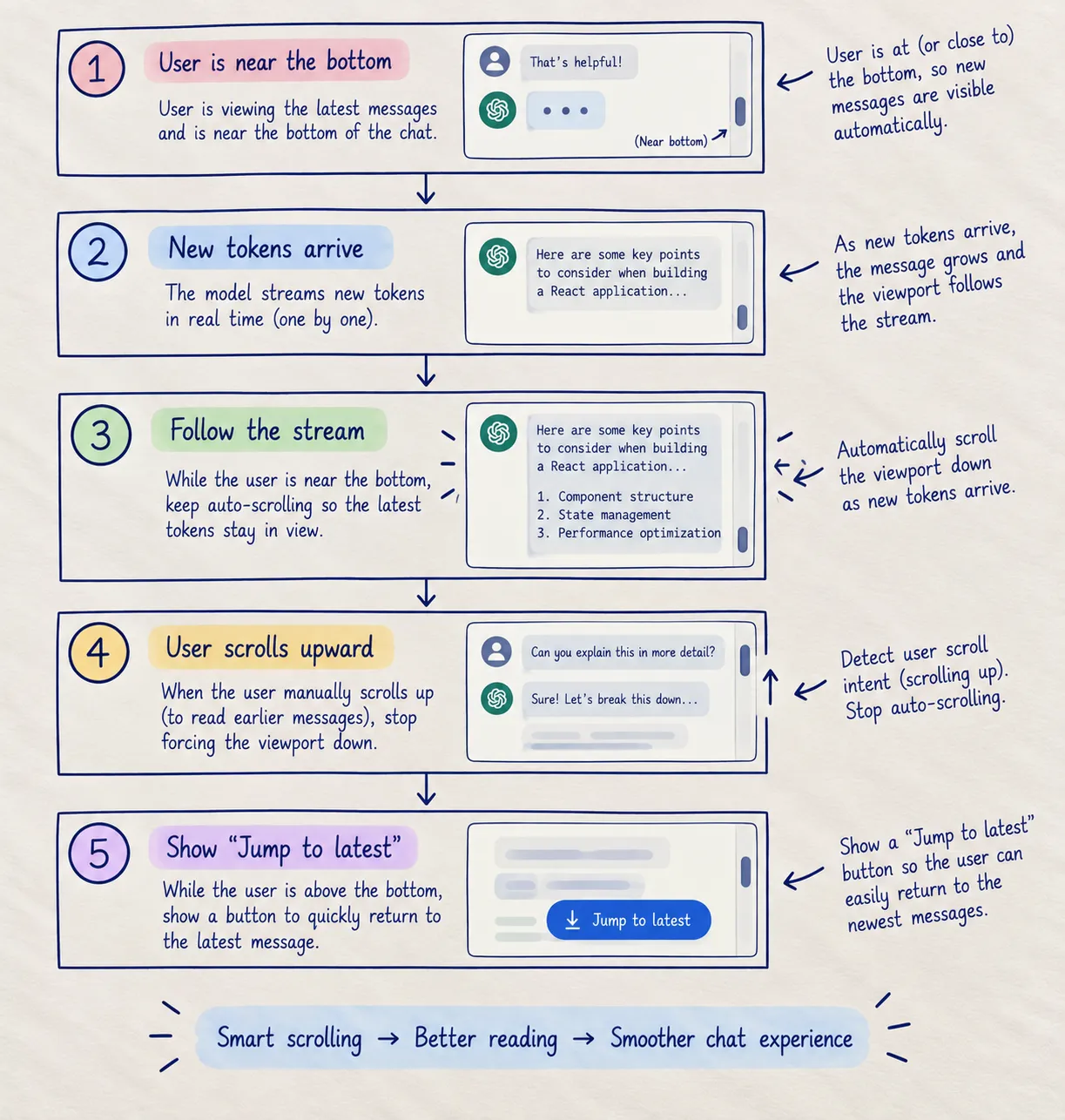
3. Streaming Performance & Main-Thread Work
High-frequency streaming updates can create unnecessary render work.
The problem is not simply:
"One token = one React render = bad FPS."
The actual cost depends on the component tree, device, browser, markdown parsing, syntax highlighting, layout work, and how the application schedules updates.
A useful architecture is:
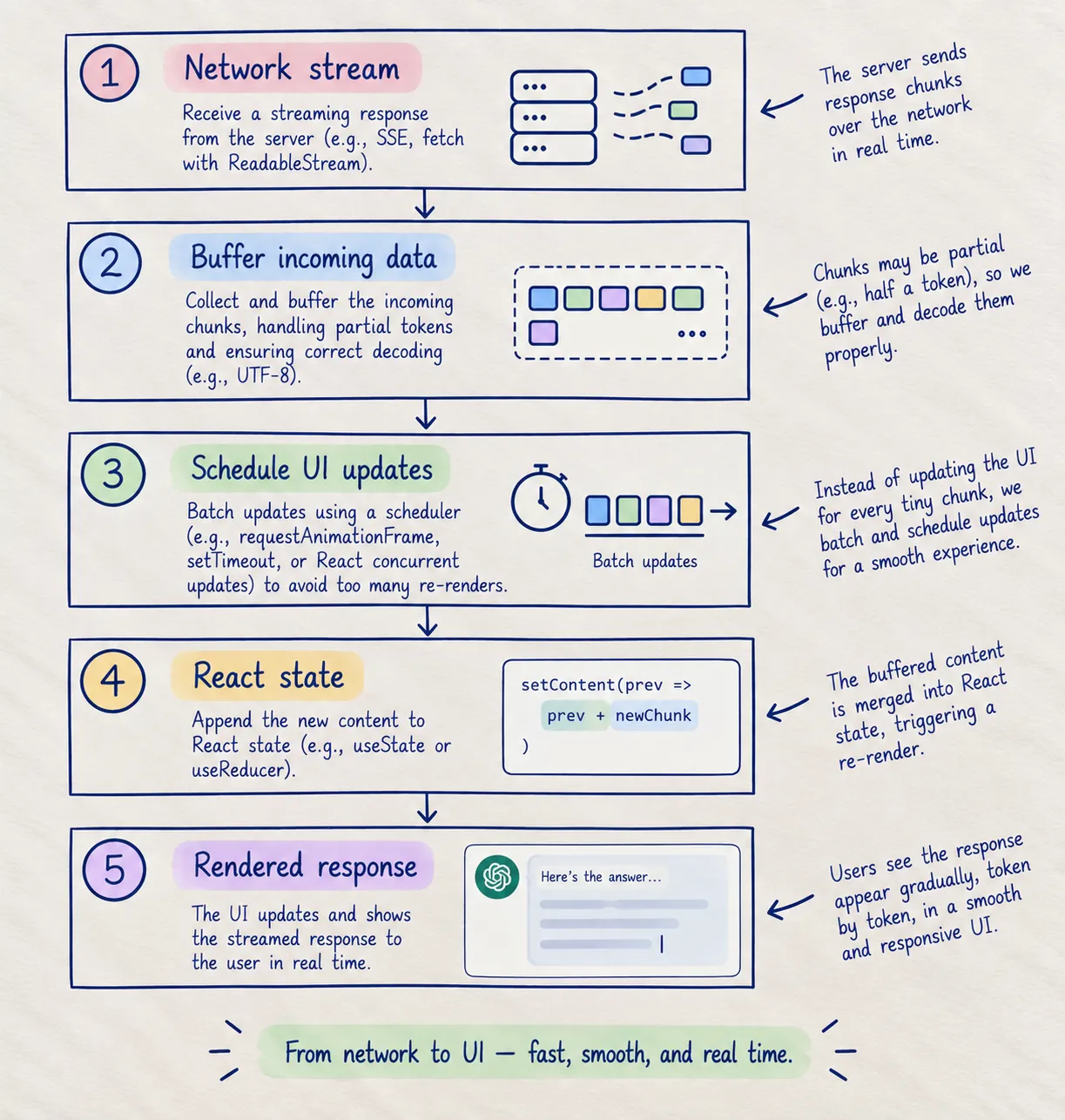
Possible techniques include:
- Buffering small chunks before updating React state.
- Using
requestAnimationFramefor display scheduling when appropriate. - Keeping expensive markdown/code rendering isolated.
- Memoizing expensive derived UI where measurement shows it helps.
- Using React's scheduling primitives appropriately rather than assuming they create a fixed frame rate.
- Measuring with browser performance tools and React DevTools instead of guessing.
4. Client-Side Resilience & Graceful Degradation
AI applications can encounter:
- Rate limits such as HTTP 429.
- Provider errors and timeouts.
- Network disconnects during streaming.
- Aborted requests.
- Safety or moderation-related refusals.
- Invalid or incomplete tool results.
- Unexpected model output.
- Provider-specific errors.
A resilient frontend should have explicit states for:
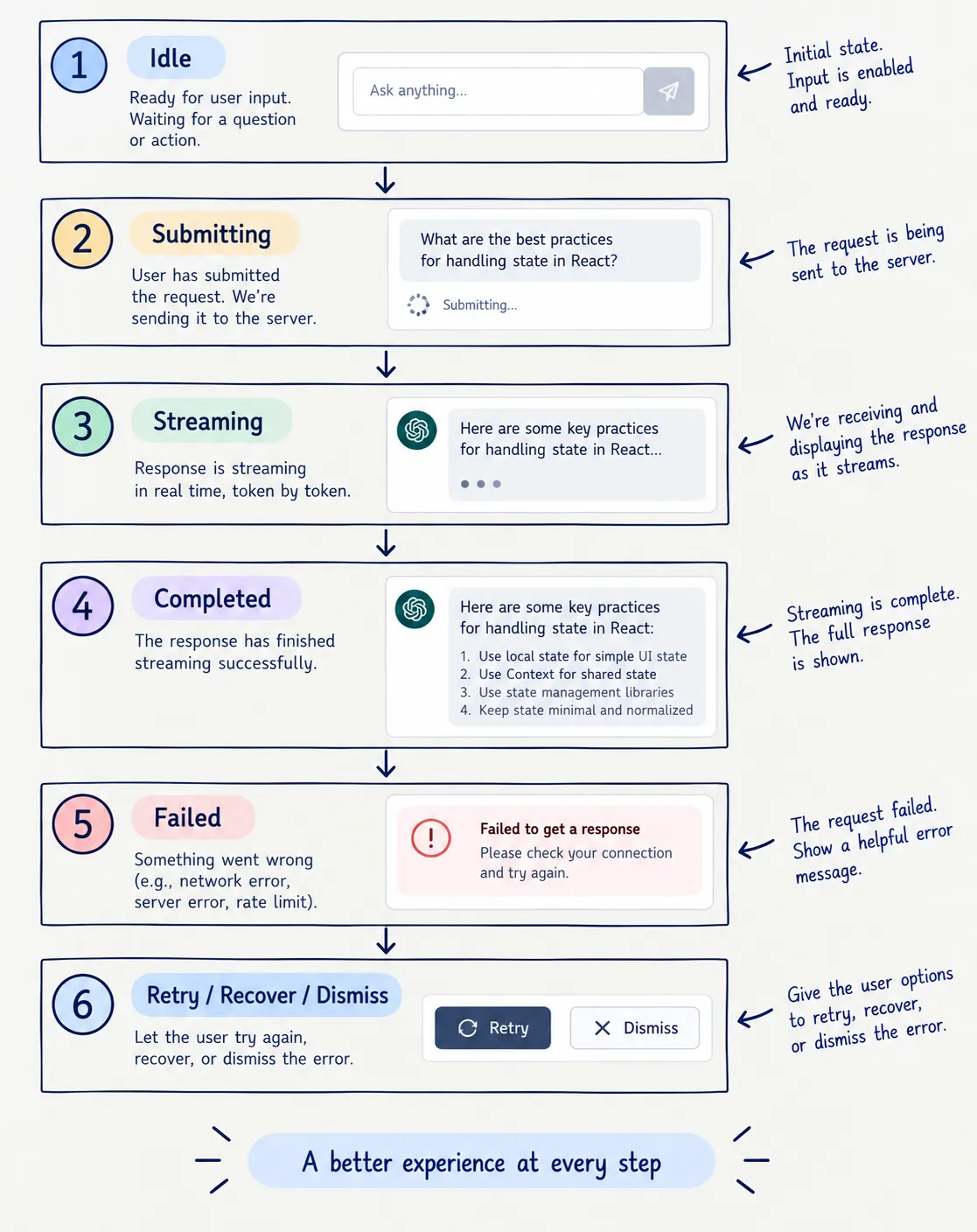
For important workflows, also consider:
- Request cancellation
- Retry policies with backoff
- Idempotency for mutations
- Partial-result handling
- Clear error messages
- Recovery without losing the user's input
- Server-side logging and observability
What You Will Learn in the AI for Frontend Curriculum
The AI for Frontend Engineers Pro Curriculum is structured into 8 progressive modules.
The curriculum is designed around a simple progression:
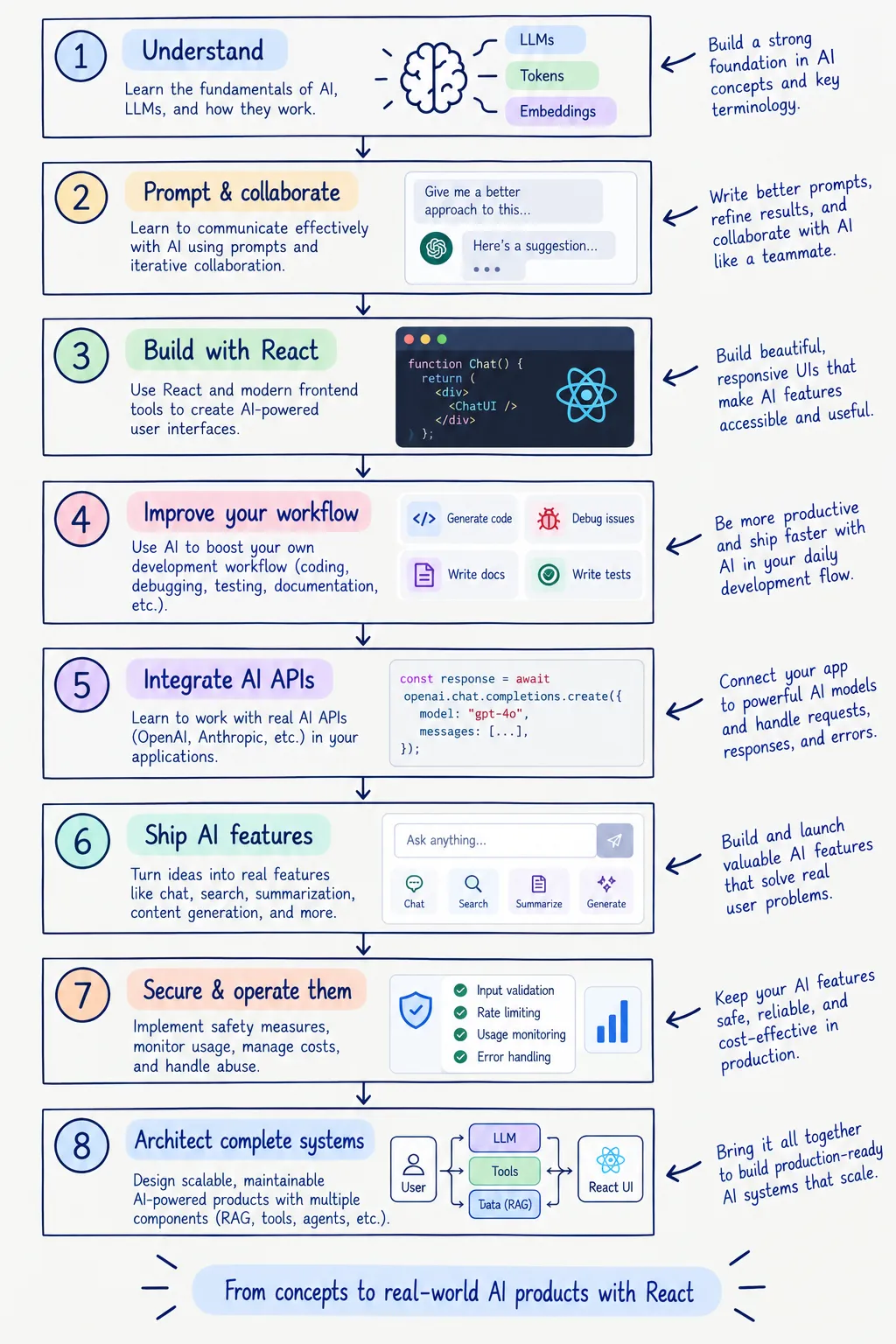
What You Will Build
Each stage moves from concepts toward practical engineering work:
| Module | Focus | Example Outcome |
|---|---|---|
| 1 | AI fundamentals | AI-powered structured extraction workflow |
| 2 | Prompting | Reusable coding and debugging workflows |
| 3 | AI + React | AI-assisted production React feature |
| 4 | Developer tooling | AI-native frontend development workflow |
| 5 | APIs & SDKs | Secure multi-provider AI integration |
| 6 | Real-world AI features | Production-style streaming AI interface |
| 7 | Security & production | Hardened AI endpoint with limits and observability |
| 8 | Architecture & capstone | Full-stack AI application architecture |
Module 1: AI Fundamentals for Developers
Stage: Beginner • Estimated Duration: 3.0 hours • Core Foundations
Build a practical mental model of modern AI systems so you can make informed engineering decisions instead of treating models as a black box.
- Lesson 1.1: The Modern AI Mental Model (Available Now): Deterministic application code vs. probabilistic model behavior.
- Lesson 1.2: How LLMs Actually Work (Available Now): Text → tokens → token IDs → embeddings → transformer processing → next-token prediction → decoding.
- Lesson 1.3: Inference, Latency & Token Economics (Available Now): Prefill vs. decode phases, TTFT, output generation throughput, KV caching, prompt caching, and cost architecture.
- Model Selection: How to compare current frontier, fast/low-cost, open-weight, and reasoning models based on capability, latency, cost, context, tools, and reliability.
- Controlling Model Output: Temperature, sampling controls, provider-specific reasoning settings, and output constraints.
- Context Engineering: System instructions, runtime state, retrieved information, tool context, output contracts, and context hygiene.
- Structured Outputs & Tool Calling: Schema-constrained generation, JSON Schema, Zod validation, tool definitions, authorization, and execution loops.
- Embeddings & Semantic Search: Vector representations, similarity, chunking, retrieval, and hybrid search.
Module 2: Prompting for Frontend Development
Stage: Beginner • Estimated Duration: 3.5 hours • High Leverage
Learn how to use AI as an engineering collaborator without giving up architectural ownership.
- Writing Effective Coding Prompts: A practical P.A.C.E. framework for defining role, task, constraints, context, and expected output.
- Providing Repository Context: Feeding project structure, TypeScript types, component contracts, and relevant files without unnecessary context.
- Constraints & Engineering Standards: Enforcing project conventions, dependency boundaries, accessibility requirements, performance expectations, and code style.
- Explaining Complex Code: Using AI to understand regex, legacy components, CSS behavior, algorithms, and unfamiliar code.
- Safe Refactoring: Asking AI to propose incremental changes while preserving behavior and tests.
- Code Review: Using AI to identify possible bugs, race conditions, cleanup issues, accessibility problems, and maintainability concerns — while verifying findings yourself.
- Debugging: Supplying errors, reproduction steps, relevant code, and runtime context to improve diagnosis.
- Testing: Generating and improving Vitest, Jest, React Testing Library, and MSW tests around user behavior.
- Documentation: Creating component documentation, Storybook examples, TypeScript documentation, and architectural notes.
Module 3: AI + React Engineering
Stage: Intermediate • Estimated Duration: 5.0 hours • Flagship Track
Use AI to accelerate React development while maintaining architecture, performance, accessibility, and code ownership.
- AI-Assisted React Development: Integrating AI into feature development without outsourcing architectural decisions.
- Production Component Generation: Generating typed, semantic components that follow existing project conventions.
- Component Refactoring: Decomposing tangled components using composition, compound components, and clear boundaries.
- Custom Hooks: Designing typed hooks for reusable browser and application behavior.
- State Management: Evaluating Context, Zustand, and modern React state patterns based on actual application needs.
- Forms: Building multi-step forms with runtime validation using React Hook Form and Zod.
- Error Handling: Designing error boundaries, fallback UI, and recoverable network states.
- Automated Testing: Generating and reviewing interaction tests with Vitest, RTL, and MSW.
- Performance Debugging: Reading React DevTools profiler data and investigating unnecessary rendering work.
- Accessibility: Reviewing semantic HTML, keyboard behavior, focus management, ARIA usage, and live regions.
- Automated PR Review: Building workflows that use AI as an additional review layer without treating AI output as authoritative.
Module 4: AI + Frontend Workflow & Developer Tooling
Stage: Intermediate • Estimated Duration: 3.5 hours • Tooling Mastery
Build an AI-native development workflow while keeping humans responsible for architecture and code quality.
- AI Coding Environments: Working effectively with tools such as Cursor, Windsurf, GitHub Copilot, and Claude Code.
- Repository Instructions: Using
AGENTS.mdand tool-specific configuration to provide durable project context and conventions. - Terminal & CLI Agents: Using coding agents for bounded tasks such as debugging, test generation, refactoring, and documentation.
- Git & Pull Requests: Using AI for commit messages, PR summaries, change explanations, and review assistance.
- Visual-to-Code Workflows: Turning Figma designs, screenshots, and wireframes into accessible, responsive implementations while manually verifying the result.
- Preventing AI Code Debt: Detecting unnecessary abstractions, duplicated code, dependency sprawl, hallucinated APIs, and architectural drift.
Module 5: AI APIs & SDKs for Frontend Developers
Stage: Intermediate • Estimated Duration: 4.0 hours • SDK Integration
Learn how to integrate model providers safely without coupling your application too tightly to one provider.
- Provider Landscape: Comparing model capabilities, authentication, pricing, rate limits, context, latency, tools, and structured-output support.
- AI SDK Foundations: Using the Vercel AI SDK's Core and UI layers to work with models and streaming interfaces.
- Current API Patterns: Understanding provider APIs and SDK abstractions while accounting for version changes.
- Client vs. Server Boundaries: Keeping private API credentials and privileged operations on the server.
- Streaming Transports: Understanding HTTP streaming, SSE, provider data streams, and browser
ReadableStreamconsumption. - Provider Abstraction: Designing provider/model selection and fallback strategies without hiding important differences between models.
- Usage & Cost Tracking: Measuring tokens, latency, failures, and per-request cost.
Module 6: Building Real-World AI Features
Stage: Advanced • Estimated Duration: 6.0 hours • Production Features
Turn AI primitives into polished user-facing features.
- Calling AI APIs from Next.js: Choosing Route Handlers, Server Actions, or other server-side patterns based on the interaction.
- Streaming Responses in React: Building responsive streaming interfaces with cancellation and clear state transitions.
- Polished Chat Interfaces: Message rendering, markdown, code blocks, scroll behavior, retry states, and accessibility.
- Semantic Search: Combining embeddings, vector search, metadata filtering, and retrieval into a useful frontend experience.
- Structured Outputs: Defining schemas, validating runtime data, handling refusals/failures, and separating structural validity from factual correctness.
- Tool Calling: Designing tools with narrow responsibilities, validated inputs, authorization checks, and user confirmation where appropriate.
- Resilient Error Handling: Handling disconnects, provider failures, retries, partial results, and cancellation.
- AI Loading & Micro-Interactions: Designing states that communicate progress without pretending the model is doing something it is not.
Module 7: Security, Auth & Production Engineering
Stage: Advanced • Estimated Duration: 4.5 hours • Production Security
Learn how to operate AI features safely when model output can influence application behavior.
- Secrets & API Key Management: Keeping credentials server-side and managing secrets safely across environments.
- Prompt Injection Defense: Treating model and retrieved content as untrusted; separating instructions from data; validating outputs; using least privilege; and testing adversarial inputs.
- Tool Security & Excessive Agency: Minimizing tool functionality, permissions, and autonomy; enforcing authorization in downstream systems; and requiring user approval for high-impact actions.
- Rate Limiting & Abuse Prevention: Protecting AI endpoints with rate limits, quotas, abuse controls, and appropriate bot protection.
- Cost Engineering: Token budgeting, usage tracking, model selection, caching, and per-user cost analysis.
- Caching: Understanding when response or semantic caching is safe, including user scope, permissions, context, model configuration, and data freshness.
- Observability: Tracking latency, token usage, errors, tool calls, and user feedback using appropriate telemetry and observability tools.
- Production Architecture: Designing clear boundaries between browser, application server, model providers, databases, and external tools.
Module 8: Full-Stack AI Architecture & Case Studies
Stage: Advanced • Estimated Duration: 5.5 hours • Capstone Architecture
Bring the previous modules together into complete AI application architectures.
- Generative UI: Building structured, tool-driven interfaces where AI influences UI without becoming the source of truth for application data.
- Enterprise RAG: Building internal knowledge experiences over documentation, codebases, and design systems while respecting permissions and freshness.
- Multimodal Interfaces: Working with images, screenshots, audio, and other supported inputs.
- Autonomous Testing Agents: Using Playwright and AI-assisted workflows for bounded test exploration and regression discovery.
- Production Architecture: Designing authentication, billing, streaming, rate limits, storage, retrieval, observability, and failure recovery as one system.
- Capstone: Architecting and implementing a production-style AI SaaS application.
The 2026 AI Frontend Learning Roadmap
Use this roadmap as a high-level map of the Pro curriculum. You do not need to memorize every technology listed below; the goal is to understand the progression and the engineering problems each stage solves.
Stage 1: Beginner Track — Foundations & High-Leverage AI Workflows
Modules 1 & 2
- Understand the probabilistic mental model: Learn where deterministic code should remain authoritative and where AI provides useful probabilistic capabilities.
- Understand tokens and context: Learn tokenization, context windows, token budgets, inference phases, and the relationship between tokens, latency, and cost.
- Learn context-aware prompting: Provide relevant repository structure, types, constraints, examples, and expected outputs instead of relying on vague prompts.
- Use AI in everyday engineering: Apply AI to explanation, debugging, refactoring, testing, documentation, and code review while verifying its output.
Outcome: You can work effectively with AI as an engineering collaborator and understand the core mechanics behind AI application behavior.
Stage 2: Intermediate Track — React, Workflows & AI APIs
Modules 3, 4 & 5
- Build better React with AI assistance: Generate and refactor components while maintaining architecture, accessibility, performance, and type safety.
- Build an AI-native development workflow: Use coding assistants, repository instructions, CLI agents, Git workflows, and visual-to-code techniques.
- Understand AI APIs and SDKs: Work with model providers, authentication, structured outputs, tool calls, streaming, usage, and provider abstractions.
- Design safe server boundaries: Keep secrets and privileged operations on the server and make authorization independent of model decisions.
Outcome: You can integrate AI into a modern frontend development workflow and build the foundations of AI-powered web applications.
Stage 3: Advanced Track — Production Features, Security & Architecture
Modules 6, 7 & 8
- Ship real AI features: Build streaming interfaces, semantic search, structured outputs, and tool-driven experiences.
- Design for failure: Handle provider errors, rate limits, disconnects, retries, cancellation, partial results, and unexpected model output.
- Secure agentic behavior: Apply least privilege, downstream authorization, prompt-injection defenses, tool restrictions, and human approval for high-impact actions.
- Control cost and observe production behavior: Track usage, latency, errors, model selection, and per-user economics.
- Architect complete systems: Bring authentication, billing, retrieval, tools, UI, observability, and model providers together in a production-style capstone.
Outcome: You can reason about AI features as production software systems rather than isolated model API calls.
What This Roadmap Is — and Isn't
This roadmap is
- A free prerequisite for the Pro AI for Frontend curriculum.
- A vocabulary and mental-model guide.
- A map of the engineering skills covered across the course.
- A reference you can return to while learning.
This roadmap is not
- A machine learning research course.
- A model-training course.
- A list of prompts to copy and paste.
- A guarantee that one AI provider, SDK, or model will remain the industry standard.
- A substitute for testing and verifying AI-generated code or output.
Recommended Engineering Mindset
Keep these principles with you throughout the curriculum:
1. AI output is data, not authority
Treat model output as untrusted application input until it has passed the appropriate validation and authorization boundaries.
2. Deterministic systems remain the source of truth
Authentication, permissions, financial calculations, database constraints, and critical business rules should not depend solely on model output.
3. Structured output solves structure, not truth
A model can produce data that perfectly matches a schema and still contain incorrect information.
4. Tools should be narrow and permissioned
Give models only the tools and permissions they actually need. Enforce authorization in application and downstream systems, not in the prompt.
5. Streaming is a UX technique, not a goal by itself
Streaming is useful when progressive output improves perceived responsiveness. It also introduces new complexity around cancellation, partial results, scrolling, rendering, and error recovery.
6. Measure before optimizing
Token batching, memoization, caching, model selection, and other optimizations should be guided by real measurements rather than assumptions.
7. Build for change
AI models, SDKs, pricing, provider APIs, and best practices change quickly. Prefer durable concepts and isolate provider-specific implementation details.
Summary & Key Takeaways
- AI changes the frontend contract: Frontend engineers now need to reason about streaming, probabilistic output, tool calls, context, runtime validation, and failure states.
- Deterministic code remains your anchor: Keep critical business rules, permissions, transactions, and calculations under deterministic application control.
- Structured output is a boundary, not a truth guarantee: Validate structure and types, but continue to verify the meaning and correctness of model-generated data.
- Tool calls are requests, not permissions: Authorization belongs in your application and downstream systems.
- Good AI UX is resilient: Streaming, cancellation, scroll behavior, retries, partial results, accessibility, and clear states matter as much as the model call.
- Production AI is an engineering discipline: Cost, security, observability, context management, and failure recovery are part of the feature.
- The goal is not to become an ML researcher: The goal is to become a frontend engineer who can confidently design, build, and operate AI-powered applications.
Official References & Further Reading
For concepts covered in this guide, start with the primary documentation:
- React documentation
- Next.js documentation
- Vercel AI SDK documentation
- OpenAI API documentation
- Anthropic API documentation
- Google Gemini API documentation
- MDN — Server-sent events
- MDN — Streams API
- OWASP GenAI Security Project — Prompt Injection
- OWASP GenAI Security Project — Excessive Agency
Maintenance note: AI providers and frontend frameworks evolve quickly. Model names, SDK APIs, pricing, context limits, and recommended patterns may change. Provider-specific implementation details in the Pro lessons will be maintained separately from this conceptual roadmap.
Your Next Step
Now that you understand the terminology, engineering boundaries, and learning path, explore the first three live interactive lessons in the curriculum:
- 👉 Start Lesson 1.1: Mental Model — Deterministic Code vs. Probabilistic AI — Build a practical mental model of deterministic logic vs. probabilistic generation.
- 👉 Lesson 1.2: How LLMs Actually Work — From Text to Predictions — BPE tokenization, embeddings, self-attention (Q/K/V), and the autoregressive decoding loop.
- 👉 Lesson 1.3: Inference, Latency & Token Economics — Prefill vs. generation hardware bottlenecks, TTFT vs. TPOT, KV and prompt caching, and unit economics.